
Mitsubishi FX Series PLC: Programming, Software & Spare Parts Guide
You're standing in front of a panel on a Friday afternoon. The line is down, the PLC is throwing an error, and the old programming laptop died last year taking the software license with it. You've got a Mitsubishi FX Series PLC staring back at you, but you can't remember which version of GX Works runs on that FX3U, and the SC-09 cable you ordered from the usual supplier doesn't seem to want to talk to Windows 11. Sound familiar? If you work with legacy Asian-origin automation, you've been there. This Mitsubishi FX Series PLC guide covers exactly what you need — which software talks to which CPU, what cables actually work, and how to source spare parts without blowing your maintenance budget.
The Mitsubishi FX Series is a family of compact, brick-style programmable logic controllers that have been in continuous production in one form or another since the late 1980s. They're the workhorses behind countless packaging lines, automotive assembly stations, textile machines, and material handling systems across Asia and the rest of the world. If you've ever opened an electrical panel on a used machine imported from Japan, Korea, or China, chances are good you found an FX inside.
The lineup breaks down into a few key sub-series:
· FX1S — Ultra-compact, fixed I/O, no expansion bus. For tiny standalone machines. Discontinued.
· FX1N — Compact with expansion capability. Widely cloned. Discontinued.
· FX2N — The golden era. Modular I/O expansion, special function modules, massive install base. Discontinued.
· FX3G — Entry-level current model. USB built-in, low cost, still in production.
· FX3U — High-performance current model. Three times the speed of FX2N, USB + Ethernet options, still in production.
· FX5U — The iQ-F series successor. Not strictly FX architecture — different instruction set, different software (GX Works3 only). Confusingly named.
Understanding which sub-series you're dealing with is the first step. Look at the front label. The CPU model is printed clearly on the front panel — FX2N-32MT, FX3U-64MR, etc. The last two digits tell you I/O count, and the letter suffix tells you output type (R = relay, T = transistor sink, T-ESS = transistor source).
This is where most of the confusion lives. Mitsubishi has released three major programming environments over the lifespan of the FX Series, and they are not backward compatible across the board.
The original Windows IDE for the FX family. GX Developer supports everything from the FX1S through the FX3U. It's old, it relies on the MELSEC Communication protocol over RS-232/RS-422, and it does not support USB connections natively (you need a serial port or a proper converter). It runs on Windows XP through Windows 7 reasonably well. Windows 10 and 11 are hit-or-miss — the SW1D5C-LLT-E version is the last release.
Supports: FX1S, FX1N, FX2N, FX3G, FX3U (and older A-Series, Q-Series)
Does not support: FX5U
The modern replacement for GX Developer. GX Works2 supports FX3G, FX3U, and FX5U (in FX mode), plus the L-Series and Q-Series. It has a much better ladder editor, supports structured text and SFC, and handles USB connections to FX3G and FX3U CPUs without a special driver.
The catch: GX Works2 does not support FX1S, FX1N, or FX2N. If you need to touch those older CPUs, you must keep a copy of GX Developer running somewhere — either on an old Windows 7 VM or a dedicated laptop.
Supports: FX3G, FX3U, FX5U, L-Series, Q-Series
Does not support: FX1S, FX1N, FX2N
This is the IDE for the iQ-F (FX5U) and iQ-R platforms. It uses a completely different project file format (.gx3) and a different programming engine. It cannot open GX Developer or GX Works2 projects directly — you have to convert them.
Supports: FX5U only (from the FX family)
Does not support: FX1S, FX1N, FX2N, FX3G, FX3U
If you have this CPU | Use this software
FX1S, FX1N, FX2N | GX Developer (8.xx)
FX3G, FX3U | GX Developer or GX Works2
FX5U (iQ-F) | GX Works3 only
Getting the physical connection right is the second biggest headache after software compatibility. Here's the real-world rundown.
The original Mitsubishi programming cable. It converts the PC's RS-232 serial port to the RS-422 signals the FX PLC uses. SC-09 works with all FX1S through FX3U CPUs. If your laptop still has a real DB9 serial port, this is the most reliable option. If you don't have a serial port, you need a USB-to-Serial adapter with a real FTDI chipset (avoid Prolific PL2303 clones — they drop characters and timing).
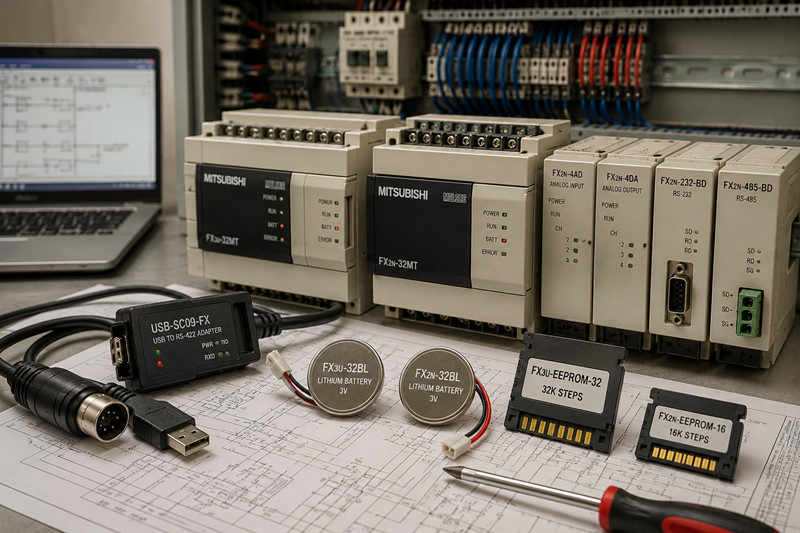
A USB-native version of the SC-09 with an FTDI chip inside. These are widely available and work with GX Developer and GX Works2. The common gotcha: many cheap knockoffs use counterfeit FTDI chips that Windows drivers refuse to recognize after 2016. Buy from a reputable supplier or at least confirm it uses genuine FTDI silicon.
The official Mitsubishi USB programming cable for FX3G and FX3U. It has a dedicated driver and works seamlessly with GX Works2. Expensive compared to third-party options but zero driver headaches if you can find one.
1. Connect the cable to the PLC (usually a round 8-pin Mini-DIN connector on FX2N/FX3U, or USB-mini on FX3G).
2. In GX Developer/GX Works2, go to Online > Transfer Setup.
3. Select the correct PC side I/F (Serial Port, USB, or Ethernet).
4. Set the PLC side I/F to match your cable type.
5. Baud rate: usually 9600 bps for serial SC-09, 115200 for USB-SC09-FX.
6. Click Communication Test. If it fails, check cable wiring, driver installation, and COM port number.
Even the most reliable PLC eventually needs maintenance. Here's what to stock or source.
The FX series uses a lithium backup battery to retain the program and latch memory when power is off. When the battery voltage drops, the CPU lights up the "BATT" LED or flashes the "ERR" LED. If you ignore it long enough, the PLC forgets its program.
· FX3U-32BL — For FX3U CPUs. Also fits some FX3G units. Standard CR2450 lithium.
· FX2N-32BL — For FX2N, FX1N, and FX1S CPUs. Different connector than the FX3U version.
Pro tip: Always replace the battery with the PLC powered on (or within a few minutes of power-down) to avoid losing the program. And always back up your program first — yes, even if you think you have a hard copy somewhere.
If your application needs more steps than the base CPU provides, or you want removable program storage, memory cassettes are the answer.
· FX2N-EEPROM-16 — 16K-step EEPROM cassette for FX2N CPUs. No battery needed for retention.
· FX3U-EEPROM-32 — 32K-step EEPROM cassette for FX3U CPUs.
· FX3U-EEPROM-64 — 64K-step version for large programs.
These slot into the top of the CPU, under the flip-up cover. They're getting hard to find new — check surplus electronics houses and automation liquidators.
One of the strengths of the FX2N and FX3U platforms is the ability to add analog I/O, communication ports, and motion control via side-mounted modules.
· FX2N-4AD — 4-channel analog input (0-10V, 4-20mA). Used everywhere in temperature and pressure monitoring.
· FX2N-4DA — 4-channel analog output. For valve positioning, VFD speed reference, etc.
· FX2N-232-BD — RS-232 communication board. Mounts on the left side of the CPU. Used for HMI connection, printer output, or modernizing serial comms.
· FX2N-485-BD — RS-485 communication board. For networking multiple PLCs or connecting to a SCADA system.
· FX3U-4AD — Updated 4-channel analog input for the FX3U platform. Higher resolution than the FX2N version.
· FX3U-232-BD — RS-232 board for FX3U. Smaller form factor.
The FX3U introduced a new left-side extension bus for CPU-specific add-ons:
· FX3U-32BL — Battery (covered above)
· FX3U-7DM — Display module for on-PLC monitoring and diagnostics
· FX3U-USB-BD — USB programming port upgrade
· FX3U-ENET-ADP — Ethernet adapter for network connectivity
The market for FX Series parts has shifted significantly in the last five years.
Discontinued (hard to find new, check surplus):
· FX1S — completely obsolete, no new production
· FX1N — replacement is FX3G
· FX2N — replacement is FX3U
· Memory cassettes for FX2N
Still in production (available new from Mitsubishi distributors):
· FX3G — budget current model, $150-$300 depending on I/O
· FX3U — mid-range current model, $300-$800 depending on I/O
· FX5U (iQ-F) — current generation, $250-$900
Where to find spare parts:
· Mitsubishi authorized distributors (for new FX3G, FX3U, FX5U)
· Industrial surplus houses (for discontinued FX1S, FX1N, FX2N parts)
· eBay and Alibaba — but check for counterfeits, especially SC-09 cables and battery packs
· TZTECHIO — check our /mitsubishi section and /plc catalog for available stock
Q: Can I use GX Works2 to program an FX2N?
A: No. GX Works2 does not support FX1S, FX1N, or FX2N CPUs. You must use GX Developer (version 8.xx or earlier) for those platforms. If you don't have a copy, some third-party tools like GX IEC Developer also work, but GX Developer remains the standard.
Q: What cable do I need for an FX3U with GX Works2?
A: Use the USB-SC09-FX cable with genuine FTDI chipset, or the official Mitsubishi FX-USB-AW. Both connect directly to the Mini-DIN8 port on the FX3U CPU. GX Works2 will treat it as a USB connection.
Q: How do I know if my FX PLC battery is dying?
A: The "BATT" LED on the front of the CPU will illuminate, or the "ERR" LED will flash in a specific pattern (two flashes then pause). You can also read the battery voltage in the PLC diagnostics menu through GX Developer or GX Works2. If the voltage reads below 2.7V, replace it soon.
Q: Will I lose my program if I change the battery?
A: Only if you take too long. The capacitor inside the CPU holds the program for a few minutes after power-down. Best practice: power up the PLC, replace the battery while power is on, then verify the program is still intact. Always back up the program to your PC first.
Q: Is the FX5U (iQ-F) backward compatible with FX3U programs?
A: Mostly yes, but with work. GX Works3 can import GX Works2 projects, and the FX5U supports most of the FX3U instruction set. Some special function module instructions and dedicated devices (D, M, S) may need re-mapping. Plan for a conversion project — it's not a drop-in replacement.
Q: Where can I still buy an FX2N CPU new?
A: You generally can't — FX2N was discontinued around 2013. Your options are: buy used/surplus (check for battery age and backup the program immediately), upgrade to an FX3U which has similar form factor and most of the same special function modules, or use an FX5U with conversion if you need new-with-warranty hardware.
Q: What's the difference between FX3U and FX3G?
A: FX3U is the higher-performance sibling — about three times faster execution speed, more program steps (64K vs 32K), supports more extension modules, and has a real-time clock as standard. FX3G is the budget option with USB-Built-in and lower cost. For simple machines, FX3G is plenty. For anything with complex math, high-speed counters, or lots of analog I/O, go with FX3U.
Q: Why won't my SC-09 cable connect on Windows 10?
A: Likely two issues: (1) your USB-to-Serial adapter has a counterfeit chipset that Windows 10 won't drive — switch to an adapter with genuine FTDI FT232RL, and (2) Windows 10 may not accept unsigned drivers for GX Developer. Try installing in Windows 7 compatibility mode, or run GX Developer inside a Windows 7 virtual machine.
The Mitsubishi FX Series PLC isn't going away overnight. There are millions of these controllers installed in factories worldwide, and many will run for another decade or more. The trick to keeping your lines running is knowing exactly which software and cable combination works for your specific CPU model, keeping a spare battery on the shelf, and knowing where to find replacement parts when the original supplier says "discontinued." Bookmark this guide, back up your programs, and keep a small stock of SC-09 cables and CR2450 batteries in your toolbox — your Friday-afternoon self will thank you.
-----------------------------------------------------------------------------------------------------------------
🏢 About TZ Tech
TZ Tech is a leading supplier of industrial automation, electrical, instrumentation, and telecommunications components. We specialize in sourcing ready-to-ship distributor stock, allowing us to offer highly competitive pricing and short lead times. Thanks to our extensive inventory, we can even source rare and discontinued parts that are hard to find elsewhere.
🛡️ Our Quality Commitment
We understand that quality is your top priority. Every component undergoes a strict screening and inspection process so you can buy with absolute confidence. For legacy or discontinued parts, we believe in complete transparency and will always provide an honest, accurate report on the product's condition. Plus, all brand-new parts come backed by a full 1-year warranty.
✉️ Get in Touch
Have a project or a part you need? Send us your inquiry today! Our team is dedicated to providing a fast response within 6 hours (excluding weekends).


Please read on, stay posted, subscribe, and we welcome you to tell us what you think.


Sitemap | Blog | XML | Privacy Policy
In addition, with your permission, we want to place cookies to make your visit anointeraction with slOC more personal. For this we use analytical and advertisingcookies. With these cookies we and third parties can track and collect yourinternet behawior inside and outside super-instrument.com. With this we and third parties adapt super-instrument.com and advertisementsto your interest. By clicking Accept you agree to this. If you decline, we only usethe necessary cookies and you unfortunately will not receive any personalizedcontent. Please visit our Cookie policy for more information or to change yourconsent in the future.
Accept and continue Decline cookies