
ABB AC800M Controller: Maintenance, Battery Replacement & Spare Parts
It's 2 AM on a Tuesday. The shift lead calls your name over the radio — the ABB AC800M controller on Line 4 is throwing a battery low alarm, and production is five minutes from a forced shutdown. You've got one window to swap the battery before the morning batch starts, and there's no room for error. Scenarios like this play out every day in oil refineries, power plants, and chemical facilities around the world. The ABB AC800M controller is a workhorse of industrial automation, but like every piece of critical infrastructure, it demands regular maintenance — especially when it comes to battery replacement, firmware management, and knowing where to find parts when they go end-of-life. This guide covers everything you need to keep your AC800M running reliably, with practical steps you can use right now.
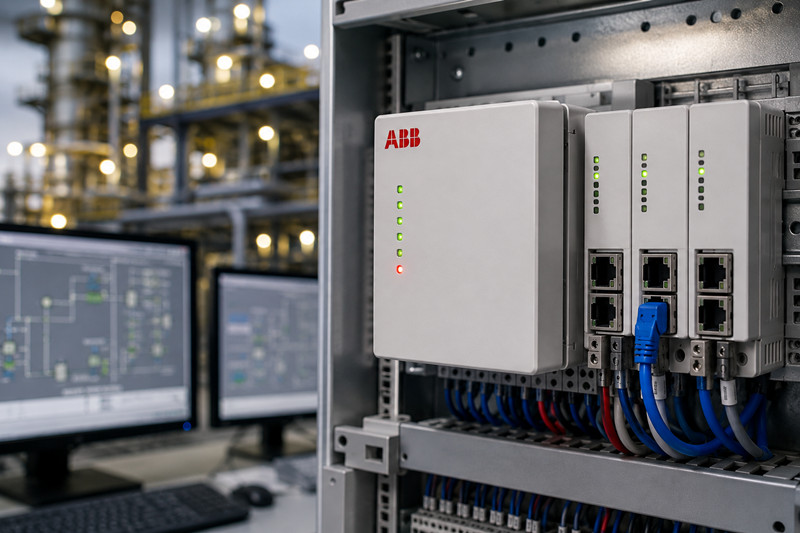
The ABB AC800M is a high-performance programmable logic controller (PLC) that forms the core of the ABB Ability System 800xA distributed control system (DCS). It's designed for complex, safety-critical process control in industries like oil and gas, power generation, chemicals, pharmaceuticals, and pulp and paper. The AC800M family includes several controller variants, each tailored to different performance and redundancy requirements:
· PM861 — Entry-level controller for smaller applications, single CPU, up to 16 MB memory
· PM862 — Mid-range controller with increased memory (32 MB) and faster processing
· PM864 — High-performance controller for demanding applications, 64 MB memory
· PM864A — Redundant-capable variant of the PM864, supporting 1:1 hot-standby configurations
· PM866 — The top-tier controller with 128 MB memory, designed for large, complex control strategies
These controllers plug into TP830 or TP840 baseplates, which provide the backplane connectivity for I/O modules, communication interfaces, and power supplies. The AC800M communicates with the rest of the 800xA system over a redundant Ethernet backbone (MB300 or Industrial Ethernet), and it supports a wide range of fieldbus protocols through dedicated communication modules like the CI854 (PROFIBUS DP), CI857 (EtherNet/IP), and CI862 (Modbus TCP).
For programming and configuration, you use ABB Control Builder M (now integrated into the 800xA engineering suite), which supports all five IEC 61131-3 programming languages — Ladder Diagram, Function Block Diagram, Structured Text, Instruction List, and Sequential Function Chart.
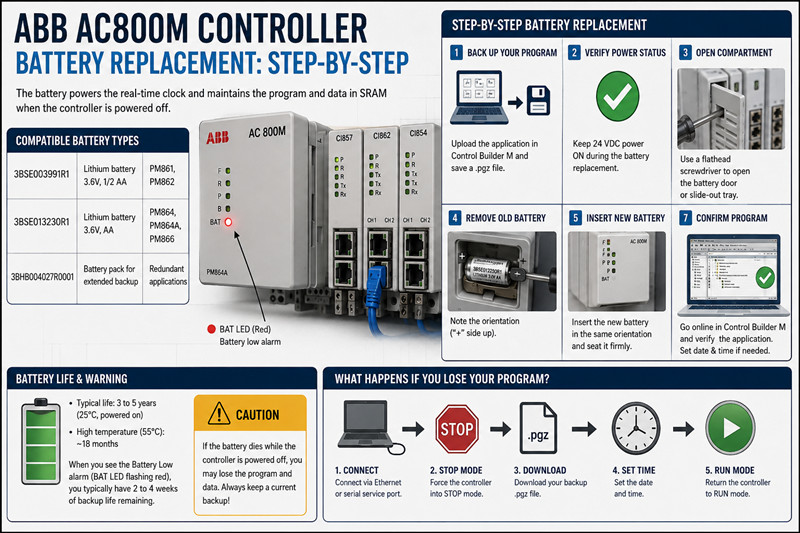
The single most frequent maintenance task on an ABB AC800M controller is battery replacement. The battery powers the real-time clock and maintains the program and data in the SRAM when the controller is powered off. If the battery dies while the system is down, you lose your application program, configuration, and historical data — which can mean hours or days of downtime to reload and recommission.
ABB uses a few standard battery types across the AC800M family:
Part Number | Description | Used In
3BSE003991R1 | Lithium battery, 3.6V, 1/2 AA | PM861, PM862
3BSE013230R1 | Lithium battery, 3.6V, AA | PM864, PM864A, PM866
3BHB004027R0001 | Battery pack for extended backup | Redundant applications
The 3BSE003991R1 is a 1/2 AA-size lithium thionyl chloride cell, while the 3BSE013230R1 is the full AA-size variant with higher capacity. Always check your controller's manual to confirm which battery your specific model requires — using the wrong one can cause improper fit or shorter backup life.
Under normal operating conditions (25°C, powered on), the AC800M battery lasts about 3 to 5 years. Higher ambient temperatures shorten battery life significantly — at 55°C, you might only get 18 months. The controller monitors battery voltage and triggers a Battery Low alarm (visible on the front-panel LED as a flashing red "BAT" indicator, and reportable via the 800xA alarm system) when voltage drops below the threshold. Once you see this alarm, you typically have 2 to 4 weeks of backup life remaining.
Replacing an AC800M battery is straightforward, but you need to follow the correct sequence to avoid data loss:
1. Back up your program. Open Control Builder M, connect to the controller, and upload the complete application. Export it to a .pgz file and store it on a secure network drive and a local backup. This step is non-negotiable — even though hot-swapping the battery should preserve the program, hardware failures during replacement do happen.
2. Verify the controller power status. The battery only needs to maintain data when main power is off. If the controller is powered on (24 VDC supply active), you can swap the battery without any risk to the program. ABB recommends keeping power on during the swap whenever possible.
3. Open the battery compartment. On PM861/PM862, the battery sits in a small door on the front panel. On PM864/PM866, it's inside a slide-out tray accessed from the front. Use a small flathead screwdriver to gently pry open the compartment.
4. Remove the old battery. Slide it out of the holder. Note the orientation — the positive terminal is usually marked with a "+" inside the compartment.
5. Insert the new battery. Place it in the same orientation as the old one. Ensure it seats firmly in the holder.
6. Close the compartment and verify. Snap the door or slide the tray back in. Check the front-panel BAT LED — it should be off after a few seconds. If it stays lit or flashes, the battery isn't making proper contact.
7. Confirm the program is intact. Open Control Builder M and go online with the controller. Verify that the application is loaded and running. Set the system clock if it shows the wrong time — this is normal after a battery swap.
If the battery dies while the controller is powered off, you'll boot into an empty system. You'll need to:
· Connect via Control Builder M over Ethernet or the serial service port
· Force the controller into STOP mode
· Download your backup .pgz file
· Set the date and time
· Return the controller to RUN mode
This is why keeping current backups is the single most important maintenance practice for any AC800M installation. Store them off-controller — on a file server, in your DCS engineering database, and ideally in a version-controlled repository.
The AC800M communicates with the outside world through its rack-based I/O and communication modules. Understanding the module lineup helps you plan upgrades and source replacements.
Module | Protocol | Notes
CI854 | PROFIBUS DP-V1 | Two RJ45 ports, up to 12 Mbps
CI857 | EtherNet/IP | Scanner and adapter modes
CI862 | Modbus TCP | Client/server, up to 20 connections
CI867 | PROFINET IO | Controller and device support
CI871 | HART | Multiplexed HART pass-through
These modules plug into the TP830/TP840 rack and communicate with the controller over the internal backplane. Common failure points are the RJ45 connectors (wear from repeated plugging) and the electrolytic capacitors on older CI854/CI857 units, which can drift after 8-10 years.
The SM (S800 I/O) series modules provide process I/O connectivity. Key modules include:
· SM810 — 16-channel digital input, 24 VDC
· SM811 — 16-channel digital output, 24 VDC, 0.5 A per channel
· SM812 — 8-channel analog input, 4-20 mA/HART
· SM813 — 8-channel analog output, 4-20 mA
· SM814 — 8-channel RTD/thermocouple input
These modules are field-mounted on S800 I/O racks and connected to the controller via a PROFIBUS DP or Ethernet I/O network. They are generally reliable but can suffer from channel failure due to surge events or moisture ingress in harsh environments.
For critical processes, the PM864A controller supports 1:1 redundancy. In a redundant pair, two PM864A controllers run in parallel — one active, one standby. They synchronize via a dedicated fiber-optic link (the "sync cable"), and if the active controller fails, the standby takes over without any interruption to the process. Redundant configurations require:
· Two PM864A controllers
· Two TP840 baseplates
· A sync fiber cable (3BSE030920R1)
· Redundant power supplies (SD821 or SD822)
· Redundant communication modules
Setting up redundancy correctly requires specific configuration in Control Builder M — you need to assign the controllers as a "High Availability 1:1" pair and configure the sync interval and timeout parameters.
Control Builder M (CBM) is the engineering tool for the AC800M. It's now included as part of the ABB Ability System 800xA engineering suite, but standalone versions are still in use at many sites.
CBM Version | Supported Firmware | Notes
5.1 | PM861/PM862 FW 3.0-3.2 | Legacy, no longer supported
6.0 | PM864/PM864A FW 4.0-4.2 | Widely deployed
6.1 | PM864/PM866 FW 4.2-5.0 | Current standard
6.2 | All models, FW 5.1+ | Latest, part of 800xA 6.2
Upgrading AC800M firmware requires:
8. Download the appropriate firmware package from ABB's support portal (requires a valid service agreement)
9. Load the firmware into Control Builder M
10. Connect to the controller and initiate the firmware download
11. The controller will reboot and run the new firmware
Warning: Firmware upgrades are irreversible on some older hardware — check the release notes before proceeding. Always upgrade during a planned outage, not during production.
The AC800M product lifecycle is mature, and ABB has transitioned or is transitioning several models to "Last Time Buy" (LTB) status. Here's the current picture:
· PM864 and PM864A — Still available new through ABB channel partners. Expect lead times of 4-8 weeks. New pricing: approximately $3,500-$5,500 depending on configuration and quantity.
· PM866 — Available but more expensive ($6,000-$8,000 new). Lead times can stretch to 10-12 weeks.
· PM861 and PM862 — LTB status on many variants. New stock is limited to existing channel inventory.
· CI854/CI857/CI862 — Generally available new, $800-$2,000 depending on module. Lead times 4-6 weeks.
· SM I/O modules — Widely available, $200-$800 per module.
· TP830/TP840 baseplates — Available new but expensive ($1,000-$2,500). Used market is active.
The used and refurbished market for AC800M components is robust. Expect:
· PM864/PM864A: $1,200-$2,500 used, depending on condition and warranty
· CI854/857/862: $350-$800 used
· SM I/O modules: $75-$300 used
· Batteries (3BSE003991R1): $15-$30 new from distributors
For reliable sourcing, work with established industrial automation resellers who test and warranty their used gear. Counterfeit parts are a known issue in the ABB market — buy from reputable sources only.
Q: How often should I replace the battery on my ABB AC800M?
A: Every 3 to 5 years under normal conditions (25°C ambient, powered on). Replace immediately when you see the Battery Low LED alarm. In high-temperature environments (above 50°C), replace every 18-24 months.
Q: Can I replace the AC800M battery while the controller is running?
A: Yes. The battery only maintains the real-time clock and SRAM data when main power is off. With 24 VDC power applied, you can swap the battery without affecting the running program. Always back up your program first as a precaution.
Q: My PM864 won't go online in Control Builder M. What's wrong?
A: Check three things: (1) The Ethernet cable and the CI857/CI862 module status LEDs, (2) The IP address in CBM's project configuration matches the controller's actual IP, (3) The controller isn't in a fault state (check the front-panel LEDs). If the MS (Module Status) LED is red, you may have a hardware fault.
Q: What's the difference between ABB AC800M and AC800PEC?
A: The AC800M is a standard process controller for the 800xA DCS, designed for general-purpose process automation. The AC800PEC is a high-speed programmable controller used for fast logic applications like gas turbine control and drives. They are not interchangeable.
Q: Is the ABB AC800M obsolete?
A: No, but some models are approaching end-of-life. The PM861 and PM862 are on Last Time Buy. The PM864A and PM866 are still actively sold and supported. ABB's successor platform is the AC 800M Hi (with extended temperature range and enhanced cybersecurity), but the standard AC800M remains widely supported.
Q: Where can I download the ABB AC800M programming software?
A: Control Builder M is available through ABB's customer portal (myABB) to customers with an active service agreement. It is also distributed as part of the ABB Ability System 800xA engineering suite. It is not available for public download — you need a valid license and support contract.
Q: What happens if I use the wrong battery in my AC800M?
A: Using an undersized battery (e.g., a 1/2 AA in a PM864 that requires AA) will result in shorter backup time and may not fit securely. Using a battery with the wrong chemistry can cause leakage or poor contact. Always verify the correct ABB part number from your controller's manual.
Q: Can I mix PM864 and PM866 controllers in a redundant pair?
A: No. Redundant pairs must use identical controller models — two PM864As or two PM866s. Mixing models is not supported by ABB and will cause synchronization failures.
The ABB AC800M controller is a proven, reliable platform that powers some of the world's most demanding industrial processes. Regular battery replacement, firmware management, and smart spare parts sourcing will keep your system running for years to come. Whether you're stocking up on spare batteries, upgrading communication modules, or planning a controller swap, understanding the AC800M family — from the entry-level PM861 to the redundant PM864A — helps you make better decisions and avoid costly downtime.
-------------------------------------------------------------------------------------------------------------------
🏢 About TZ Tech
TZ Tech is a leading supplier of industrial automation, electrical, instrumentation, and telecommunications components. We specialize in sourcing ready-to-ship distributor stock, allowing us to offer highly competitive pricing and short lead times. Thanks to our extensive inventory, we can even source rare and discontinued parts that are hard to find elsewhere.
🛡️ Our Quality Commitment
We understand that quality is your top priority. Every component undergoes a strict screening and inspection process so you can buy with absolute confidence. For legacy or discontinued parts, we believe in complete transparency and will always provide an honest, accurate report on the product's condition. Plus, all brand-new parts come backed by a full 1-year warranty.
✉️ Get in Touch
Have a project or a part you need? Send us your inquiry today! Our team is dedicated to providing a fast response within 6 hours (excluding weekends).

Please read on, stay posted, subscribe, and we welcome you to tell us what you think.


Sitemap | Blog | XML | Privacy Policy
In addition, with your permission, we want to place cookies to make your visit anointeraction with slOC more personal. For this we use analytical and advertisingcookies. With these cookies we and third parties can track and collect yourinternet behawior inside and outside super-instrument.com. With this we and third parties adapt super-instrument.com and advertisementsto your interest. By clicking Accept you agree to this. If you decline, we only usethe necessary cookies and you unfortunately will not receive any personalizedcontent. Please visit our Cookie policy for more information or to change yourconsent in the future.
Accept and continue Decline cookies