
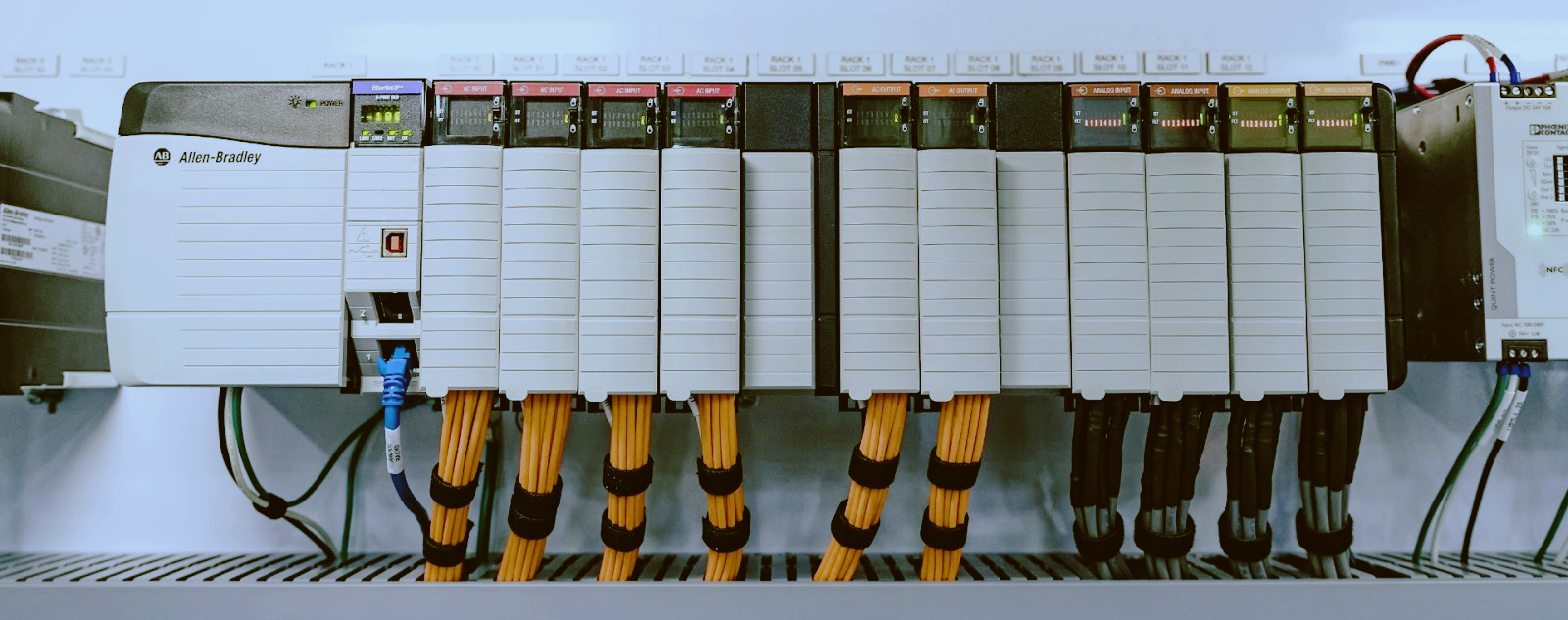
Allen-Bradley SLC 500: Battery Replacement, Program Backup & Parts Guide
You walk into the plant on a Monday morning and the machine won't run. The SLC 500 CPU shows a solid FLT LED. The HMI is dark. You plug in your laptop, open RSLogix 500, and get nothing — the program is gone. A dead battery just wiped months of engineering work.
This is the reality of the Allen-Bradley SLC 500 platform. These controllers have been running production lines since the early 1990s, and they depend on a simple lithium battery to retain the program when main power is off. When that battery dies, the ladder logic disappears. No backup means a full re-write from scratch.
This guide covers everything you need to know about SLC 500 battery replacement: the correct part numbers, the exact step-by-step procedure, how to back up your program before the battery dies, and which spare parts to keep on the shelf.
The SLC 500 (Small Logic Controller) is a modular PLC platform introduced by Allen-Bradley (now Rockwell Automation) as a more capable alternative to the MicroLogix series. It uses the 1747-series backplane and supports a wide range of I/O modules, communication cards, and specialty modules.
Despite being officially discontinued in the late 2000s, the SLC 500 remains in active service across thousands of facilities in North America and Latin America. Many plants have no immediate plan to migrate because the hardware works, the spare parts are still available on the secondary market, and a full migration to CompactLogix or ControlLogix is expensive and time-consuming.
The key components of an SLC 500 system are:
· CPU module (1747-L5xx series — 5/01, 5/02, 5/03, 5/04, 5/05)
· Backplane (1746-Axx series — 4, 7, 10, 13, or 16 slots)
· Power supply (1746-Px series)
· I/O modules (1746-xxx discrete, analog, and specialty)
· Memory module (1747-M1, M2, or M3 — optional program storage)
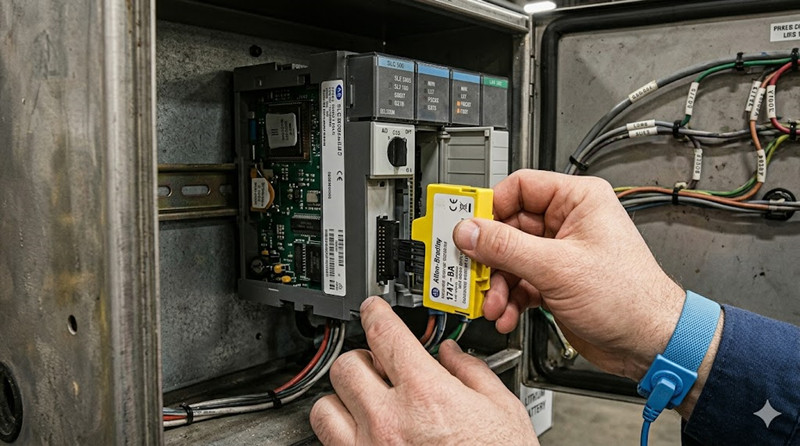
· Battery (1747-BA or 1770-XYC)
The battery is located inside the CPU or, in some chassis configurations, mounted externally. Without it, the CPU retains the program only as long as the chassis power supply is energized. A power interruption of any length means program loss.
Replacing the battery is straightforward, but skipping the backup step first is where people get burned. Here is the correct sequence.
Before touching the battery, connect to the SLC 500 via RSLogix 500 and upload the program.
Procedure:
1. Connect your programming laptop to the SLC 500 via the serial port (DF1/DH-485), DH+ module, or Ethernet (5/05 only).
2. Open RSLogix 500 and select Comms > System Comms.
3. Double-click the processor node to go online.
4. Go to Comms > Upload and select the correct processor type.
5. Save the uploaded file (`.RSS` format) to a safe location — ideally three locations: local machine, network drive, and USB stick.
If the battery is already dead and the program is gone, this step won't help. You'll need to restore from a previous backup or a memory module.
Two battery part numbers are compatible with the SLC 500:
Part Number | Description | Typical Life
1747-BA | Standard SLC 500 battery assembly (BA = Battery Assembly) | 2-5 years
1770-XYC | NEMA 4/4X external battery housing and cable | 2-5 years
Both use the same 3.6V lithium thionyl chloride (LiSOCl2) chemistry — the same cells used in industrial memory backup applications worldwide. The 1747-BA is a direct-fit battery that plugs into the CPU front panel. The 1770-XYC is a remote-mounted battery pack with a cable, used when the CPU is in a sealed enclosure or when the battery needs to be accessible without opening the main cabinet.
The 1747-BA is the part you want for standard installations. It's widely available from Rockwell Automation distributors and industrial electronics suppliers. Expect to pay around $30–60 depending on the source.
Where the battery lives depends on which SLC 500 processor you have:
SLC 5/01, 5/02 (1747-L511, L514, L524, L531): The battery is inside the CPU housing. Remove the small door on the front panel — the battery connector is behind it. These are the oldest processors and have the highest rate of battery failure because the units themselves are often 25+ years old.
SLC 5/03, 5/04 (1747-L532, L541, L542, L543): Same arrangement — a battery door on the front of the CPU. The connector is keyed so you can't plug it in backwards.
SLC 5/05 (1747-L551, L552, L553, L554): Identical front-panel battery access as the 5/03 and 5/04. The 5/05 is the most common processor still in service because it adds built-in Ethernet (10Base-T).
You need:
· New 1747-BA battery
· Small flathead screwdriver (optional, for battery door)
· Antistatic wrist strap (recommended)
Steps:
6. Leave the chassis power ON during battery replacement. The battery only backs up the RAM when main power is off. With power on, the CPU runs from the power supply and the battery circuit is inactive — you can swap it hot without losing the program.
7. Open the battery door on the CPU front panel using a flathead screwdriver or your thumbnail on the latch.
8. Disconnect the old battery connector by pulling the plug straight out.
9. Connect the new 1747-BA battery — the connector only fits one way.
10. Close the battery door.
11. Verify the CPU status. The BAT LED (if your processor has one) should turn off. On the SLC 5/03, 5/04, and 5/05, you can also check processor status under Processor Status in RSLogix 500.
If you must replace the battery with main power OFF, you have approximately 30 minutes to swap the battery before the backup capacitor discharges and the RAM loses its program. Do not rely on this.
A 1747-BA battery is cheap insurance. A 1747 memory module is the real safety net.
The Allen-Bradley 1747-M1, 1747-M2, and 1747-M3 are EEPROM-based memory modules that plug into the SLC 500 CPU and retain the entire program without any battery. They are available in different sizes:
· 1747-M1: 64K memory module
· 1747-M2: 128K memory module
· 1747-M3: 256K memory module
How they work: You save the program to the memory module from RSLogix 500 (Processor > Save to Memory Module). On power-up, the CPU checks for a memory module. If one is present and loaded with a valid program, the CPU can either load from the module or ignore it — the behavior is configurable via the module's write-protect switch.
Recommendation: Install a 1747-M2 or M3 in every SLC 500 chassis you maintain. Even if the battery dies catastrophically and the RAM is wiped, the CPU can reload the program automatically from the memory module on the next power cycle. This single $100–200 part has saved more production shifts than any battery ever will.
If you're maintaining SLC 500 systems, you need to understand the differences between the CPU models.
· Entry-level processor: limited instruction set, no real-time clock
· RS-232 port (DH-485 protocol)
· Max 4096 I/O points
· Memory: 4K or 8K
· Best for: simple machine control, conveyor logic, packaging
· Added real-time clock, additional instructions (FAL, FSC, PID)
· RS-232 port (DH-485)
· Max 4096 I/O
· Memory: 8K or 16K
· Best for: moderate complexity applications with timing and sequencing
· Major step up: added RS-232 DF1 full-duplex protocol, flash OS upgrade capability
· Real-time clock with battery backup
· Memory: 16K or 32K
· Faster execution than 5/01 or 5/02
· Best for: batch processes, more complex logic
· Added DH+ (Data Highway Plus) network port — critical for remote I/O and peer-to-peer communication with PLC-5 and ControlLogix
· Memory: 16K to 64K
· Best for: distributed control systems, multi-processor applications
· Added built-in 10Base-T Ethernet (EtherNet/IP)
· Memory: 16K to 64K
· Can communicate via serial, DH-485, or Ethernet
· Most common processor still in active service
· Best for: any application needing Ethernet connectivity without an additional 1747-KE or 1747-AIC module
All SLC 500 I/O modules and CPUs mount on a 1746-series backplane. Available sizes:
Chassis | Slots | Typical Use
1746-A4 | 4 slots | Small panel, single-machine control
1746-A7 | 7 slots | Medium panel with mixed I/O
1746-A10 | 10 slots | Larger system with analog and specialty modules
1746-A13 | 13 slots | Large system, distributed I/O racks
1746-A16 | 16 slots | Maximum expansion without remote chassis
Chassis are interchangeable — you can move a CPU and I/O between any 1746-Axx backplane as long as the power supply rating is adequate.
The SLC 500 supports three major communication protocols:
DH-485 (Data Highway 485): The native protocol for SLC 500. Uses a 4-wire RS-485 interface. Maximum 32 nodes, 4000 ft total cable length. Supported by all SLC 5/01 through 5/05 processors. Requires the 1747-PIC (PCMCIA Interface Card) or 1747-UIC (USB Interface Converter) to connect a modern laptop.
DH+ (Data Highway Plus): Available only on the SLC 5/04. High-speed token-passing network. 57.6 Kbps standard, up to 230.4 Kbps. Used in larger Rockwell automation systems for PLC-to-PLC communication and SCADA integration.
EtherNet/IP: Built-in on the SLC 5/05 or available as an add-on via the 1747-KE (Ethernet bridge module) for other processors. EtherNet/IP is the standard for modern industrial Ethernet — the 5/05 uses 10Base-T (10 Mbps), which is slow by modern standards but perfectly adequate for program uploads/downloads and HMI communication.
The SLC 500 is discontinued by Rockwell Automation, but parts are far from impossible to find.
The 1747-BA and 1770-XYC are still manufactured by third parties and widely stocked. Rockwell also still produces the 1747-BA. Expect to pay $30–60. They are available from:
· Rockwell distributors (Graybar, Rexel, Wesco, Motion Industries)
· Industrial supply houses (McMaster-Carr, AutomationDirect, Radwell)
· eBay and surplus sellers (prices vary wildly — verify condition)
New-old-stock CPUs command a premium ($200–800 depending on model). The SLC 5/05 is the most expensive due to Ethernet demand. Used modules are available from:
· Radwell International: Full inventory, tested, warranty
· PLC Center: Specializes in Allen-Bradley surplus
· eBay: High risk of counterfeit or damaged modules — test everything
1747-M1, M2, M3 modules are harder to find than the CPUs themselves. The 1747-M3 (256K) is the most sought-after and the rarest. Plan to spend $100–250 for a tested module.
1746-Axx backplanes and 1746-Px power supplies are still easy to find at reasonable prices. These are the least failure-prone components in the system.
A: Typical life is 2–5 years depending on ambient temperature and power-off time. Higher temperatures reduce battery life. Install a fresh battery every 3 years during preventive maintenance.
A: Yes. In fact, this is the recommended method. With chassis power applied, the battery circuit is idle — you can swap the battery hot without losing the program. Leave the chassis energized.
A: If the chassis loses main power with a dead battery, the CPU's RAM is wiped and the program is lost. The CPU will show a FLT LED and will not run until the program is re-downloaded or loaded from a memory module.
A: No. The 1747-BA uses a 3.6V lithium thionyl chloride cell with a specific connector and form factor. Using a non-approved battery can damage the CPU or create a fire risk. Use only 1747-BA or 1770-XYC.
A: The 1747-BA is a direct-fit battery that plugs into the CPU front panel. The 1770-XYC is a remote-mount battery pack with a cable for NEMA 4/4X enclosures. Both use the same cell chemistry.
A: It depends on the memory module's write-protect switch setting. If the switch is in the LOAD position, the CPU loads the program from the module at power-up, even if the RAM is empty. If in PROTECT position, the module only saves data from the CPU and does not auto-load.
A: Rockwell discontinued repair services for most SLC 500 processors. Third-party repair shops like Radwell offer repair services with warranties. For critical applications, keep a spare processor on the shelf.
A: For serial connections, use a 1747-UIC (USB Interface Converter) or a third-party USB-to-DF1 adapter. For 5/05 processors, use a standard Ethernet cable (straight-through or crossover depending on your switch). For DH+ (5/04), you need a 1784-PCMK PCMCIA card or a USB-to-DH+ converter.
The Allen-Bradley SLC 500 is a workhorse platform that refuses to retire. Keeping it running comes down to three things:
12. Back up your programs — upload and save `.RSS` files from every processor, and keep copies off the plant floor.
13. Replace the 1747-BA battery every 3 years — set a calendar reminder. A $40 battery is cheap compared to a lost program.
14. Install a 1747-M2 or M3 memory module — this is the single best upgrade you can make. It survives battery failure, power surges, and operator errors.
For new systems, consider migrating to CompactLogix 5380 or ControlLogix 5580. But for the thousands of SLC 500 systems still running production today, a proper battery maintenance schedule and a memory module are all you need to keep the lines running.
-------------------------------------------------------------------------------------------------------------------
🏢 About TZ Tech
TZ Tech is a leading supplier of industrial automation, electrical, instrumentation, and telecommunications components. We specialize in sourcing ready-to-ship distributor stock, allowing us to offer highly competitive pricing and short lead times. Thanks to our extensive inventory, we can even source rare and discontinued parts that are hard to find elsewhere.
🛡️ Our Quality Commitment
We understand that quality is your top priority. Every component undergoes a strict screening and inspection process so you can buy with absolute confidence. For legacy or discontinued parts, we believe in complete transparency and will always provide an honest, accurate report on the product's condition. Plus, all brand-new parts come backed by a full 1-year warranty.
✉️ Get in Touch
Have a project or a part you need? Send us your inquiry today! Our team is dedicated to providing a fast response within 6 hours (excluding weekends).


Please read on, stay posted, subscribe, and we welcome you to tell us what you think.


Sitemap | Blog | XML | Privacy Policy
In addition, with your permission, we want to place cookies to make your visit anointeraction with slOC more personal. For this we use analytical and advertisingcookies. With these cookies we and third parties can track and collect yourinternet behawior inside and outside super-instrument.com. With this we and third parties adapt super-instrument.com and advertisementsto your interest. By clicking Accept you agree to this. If you decline, we only usethe necessary cookies and you unfortunately will not receive any personalizedcontent. Please visit our Cookie policy for more information or to change yourconsent in the future.
Accept and continue Decline cookies