Beckhoff TwinCAT PLC Programming: A Practical Guide for Automation Engineers
You are maintaining a production line and the customer just dropped a new requirement: integrate a vision system, add three servo axes, and log cycle data to a SQL database — all on a single controller. The old PLC platform can't handle it without stacking three CPUs and a separate HMI box. This is exactly where Beckhoff TwinCAT turns the conversation around. TwinCAT (The Windows Control and Automation Technology) transforms any compatible PC into a real-time PLC, soft motion controller, and HMI runtime all at once. For engineers tired of fighting proprietary hardware limitations, it is a paradigm shift worth understanding thoroughly.
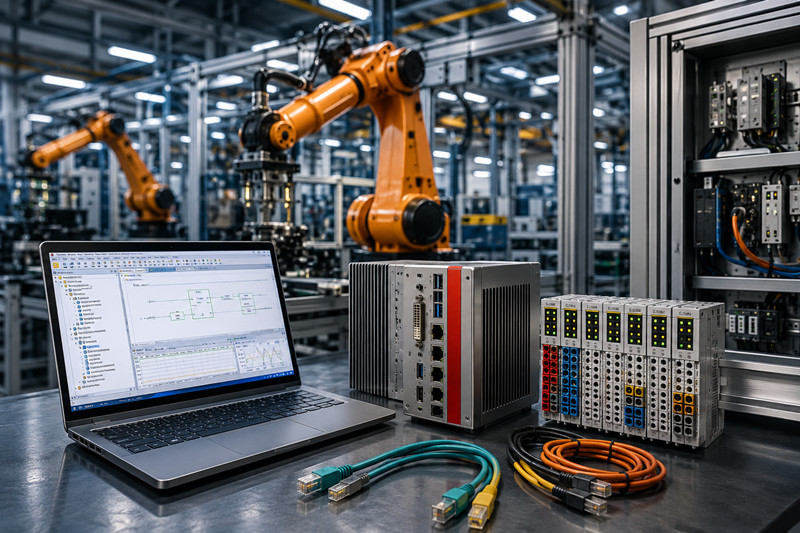
TwinCAT is not a traditional PLC. It is a software-based runtime that runs on standard industrial PCs running Windows or a real-time operating system. At its core, TwinCAT extends the operating system with a real-time kernel — the TwinCAT Real-Time Environment — that executes control tasks at deterministic cycle times down to 50 microseconds, regardless of what else the PC is doing.
The programming environment, TwinCAT XAE (eXtended Automation Engineering), is fully embedded in Microsoft Visual Studio. This is not a half-baked add-in; it is a proper engineering shell where you write PLC code in any of the five IEC 61131-3 languages (Structured Text, Ladder Diagram, Function Block Diagram, Sequential Function Chart, or Instruction List), configure EtherCAT fieldbuses, tune servo drives, set up HMI screens, and debug everything from one window.
TwinCAT 3, the current major version, also supports C++ and MATLAB/Simulink modules compiled directly into the real-time context. If your team has algorithm engineers who write C++ rather than ladder logic, they can contribute without learning a new language.
You will most likely run TwinCAT on Beckhoff's CX series embedded PCs. These are fanless industrial computers that bridge the gap between a microcontroller and a full-blown server. Here is what the lineup looks like in practice:
CX20xx series (e.g., CX2020, CX2040) — These are the workhorses for medium-sized machines. The CX2020 runs an Intel Atom or Celeron processor with 4 GB RAM and two EtherCAT-capable ports. A typical configuration is a packaging machine with six servo axes, 200 digital I/O points, and an integrated HMI. You can program the whole thing with a single TwinCAT 3 project. List price for a CX2020 with TwinCAT TC1250 (PLC runtime) is roughly $1,200–1,500 depending on the exact variant.
CX51xx series (e.g., CX5120, CX5130) — These are the heavy-duty controllers. The CX5120 uses an Intel Core i5 or i7, up to 16 GB RAM, and supports multiple independent EtherCAT networks. These are common in semiconductor tooling, printing presses, and large material handling systems. A CX5130 with 8 GB RAM, a 64 GB SSD, and TwinCAT TC1250 runs about $2,800–3,500.
On-site setup works like this: You cable your EtherCAT terminals (EK1100 coupler + EL-series I/O modules) to the CX's built-in EtherCAT port. You connect the engineering laptop via Ethernet to the CX's second port. You open Visual Studio, create a new TwinCAT XAE project, scan the EtherCAT bus, and the entire I/O configuration populates automatically. From there, you write your logic, assign variables to physical I/O, and download the project. The PLC boots, the runtime starts, and the machine runs.
A concrete example from a cement plant in the UAE: A material blending skid using a CX2040 controlling 14 dosing screw feeders via EL7041 stepper motor terminals, with Modbus TCP communication to a plant SCADA. The entire control logic — batch sequencing, recipe management, alarm handling — fit in about 3,200 lines of Structured Text. Commissioning took four days from first power-on to production.
TwinCAT is powerful, but it has quirks that trip up engineers coming from traditional PLCs.
Licensing is not hardware-locked. Unlike Siemens or Rockwell where the runtime license is tied to the CPU serial number, TwinCAT licenses are stored on a USB dongle (the TwinCAT Security Dongle) or on the CX's onboard memory. You buy a license key file from Beckhoff, activate it via the TwinCAT License Service, and it binds to the hardware ID. If the CX fails and you swap in a replacement, you must reactivate the license. Always keep your license key files in source control. Price for a basic TC1250 PLC runtime license: approximately $350–500. The full TC3 CNC + Robotics package (TC3xxx series) runs $2,500–6,000 depending on axis count.
The real-time kernel is picky about drivers. If you install TwinCAT on a generic Windows PC (not a Beckhoff IPC), you may run into Ethernet driver issues. TwinCAT requires specific network interface chipsets (Intel I210 or I219 are the safe bets) to achieve the sub-millisecond EtherCAT cycle times. Realtek chipsets, common on consumer motherboards, do not work reliably. This is why Beckhoff sells the CX series — everything is pre-validated. If you are retrofitting an existing PC, check the chipset first.
Task prioritization matters more than you think. TwinCAT runs tasks in priority levels. A freewheeling task (like a Modbus TCP handler set to the same priority as your main PLC task) can blow your cycle time budget. The standard pattern is: main PLC task at 1–10 ms (highest priority), HMI communication at 50–100 ms (medium), and data logging at 200–500 ms (lowest). Violate this hierarchy and you will see random watchdog faults that look like hardware problems but are purely software scheduling issues.
Memory management is manual. TwinCAT does not garbage-collect. If you allocate memory dynamically in a cyclic task (e.g., using M_ALLOC or creating variable-length arrays inside a program that runs every 2 ms), you will eventually fragment the memory space and crash the runtime. Pre-allocate everything. Use fixed-size arrays and circular buffers. Treat any dynamic allocation as a defect.
For more on CX-series hardware selection, see our Beckhoff CX family comparison and our PC-based control architecture guide.
Beckhoff pricing is transparent but varies by region. Here are realistic ballpark figures for the United States and Europe as of mid-2026:
Item | Estimated Price (USD)
CX2020 embedded PC + 4GB RAM + 32GB SSD | $1,200 – $1,500
CX5130 embedded PC + 8GB RAM + 64GB SSD | $2,800 – $3,500
TwinCAT TC1250 PLC runtime license (1 per CPU) | $350 – $500
TwinCAT TC3 NC PTP (servo control, up to 4 axes) | $950 – $1,400
TwinCAT TC3 CNC (up to 9 axes) | $2,500 – $4,000
EL1008 (8-channel digital input, 24V) | $45 – $60
EL2008 (8-channel digital output, 24V, 0.5A) | $55 – $75
EL7041 (1-channel stepper motor terminal) | $180 – $240
TwinCAT Security Dongle (USB) | $90 – $120
Lead times on CX20xx series are typically 4–6 weeks. CX51xx series may run 6–10 weeks. Licenses are delivered as activation files within 1–2 business days of purchase. We stock common CX models and I/O terminals — check our current inventory and pricing page for real-time availability.
Q: Can I run TwinCAT on a standard laptop or desktop PC?
A: Yes, for development and testing. TwinCAT XAE runs on any Windows 10/11 Pro or Enterprise system. For production, use a Beckhoff CX-series IPC or an industrial PC with a validated Ethernet chipset (Intel I210/I219). Consumer-grade hardware with Realtek NICs will not achieve reliable real-time EtherCAT performance.
Q: What is the difference between TwinCAT 2 and TwinCAT 3?
A: TwinCAT 2 uses a standalone development environment. TwinCAT 3 is integrated into Visual Studio, supports C++ and Simulink modules in the real-time context, and uses a more modern runtime architecture. Beckhoff no longer actively develops TwinCAT 2. All new projects should use TwinCAT 3.
Q: Do I need to know IEC 61131-3 to use TwinCAT?
A: Yes, but you only need one language. Structured Text (ST) is the most common choice for new development because it reads like Pascal or C. If your team has a Ladder Logic background, TwinCAT supports that too. The more advanced features (C++ modules, custom function blocks in other languages) are optional.
Q: How does TwinCAT handle firmware updates?
A: Firmware updates are done through the TwinCAT System Manager. You download a new firmware image (.efi) to the CX via Ethernet, reboot, and the controller comes up on the new version. Downgrades are possible but require a clean install. Always test firmware updates on a spare controller first.
Q: Can TwinCAT communicate with other PLCs and SCADA systems?
A: Yes, extensively. TwinCAT supports OPC UA (server and client), Modbus TCP/RTU, PROFINET (as controller or device), EtherNet/IP, BACnet, and many other protocols via dedicated function blocks or add-on products. It also has native SQL database integration for logging.
Q: What happens if the Windows OS crashes on a CX controller?
A: The CX series uses TwinCAT/BSD (a real-time OS based on FreeBSD) or Windows 10/11 IoT Enterprise. On the Windows variant, the TwinCAT real-time kernel is separate from the Windows kernel. A Windows crash halts HMI and non-real-time services, but the real-time PLC logic continues running. The CX can be configured to auto-reboot and restart the TwinCAT runtime in under 60 seconds. See our TwinCAT deployment best practices for redundancy configurations.
Beckhoff TwinCAT is not just a PLC — it is a complete automation platform that replaces the traditional stack of controller, motion controller, HMI, and gateway with a single software runtime on standard hardware. The learning curve is real, especially around real-time configuration and licensing. But for engineers who need performance, flexibility, and a unified toolchain, TwinCAT delivers where conventional PLCs hit walls. Start with a CX2020 and a basic TC1250 license, build a small proof-of-concept, and you will understand why PC-based control is the dominant architecture in advanced manufacturing everywhere from Germany to Dubai.
------------------------------------------------------------------------------------------------------------------
🏢 About TZ Tech
TZ Tech is a leading supplier of industrial automation, electrical, instrumentation, and telecommunications components. We specialize in sourcing ready-to-ship distributor stock, allowing us to offer highly competitive pricing and short lead times. Thanks to our extensive inventory, we can even source rare and discontinued parts that are hard to find elsewhere.
🛡️ Our Quality Commitment
We understand that quality is your top priority. Every component undergoes a strict screening and inspection process so you can buy with absolute confidence. For legacy or discontinued parts, we believe in complete transparency and will always provide an honest, accurate report on the product's condition. Plus, all brand-new parts come backed by a full 1-year warranty.
✉️ Get in Touch
Have a project or a part you need? Send us your inquiry today! Our team is dedicated to providing a fast response within 6 hours (excluding weekends).


Please read on, stay posted, subscribe, and we welcome you to tell us what you think.


Sitemap | Blog | XML | Privacy Policy
In addition, with your permission, we want to place cookies to make your visit anointeraction with slOC more personal. For this we use analytical and advertisingcookies. With these cookies we and third parties can track and collect yourinternet behawior inside and outside super-instrument.com. With this we and third parties adapt super-instrument.com and advertisementsto your interest. By clicking Accept you agree to this. If you decline, we only usethe necessary cookies and you unfortunately will not receive any personalizedcontent. Please visit our Cookie policy for more information or to change yourconsent in the future.
Accept and continue Decline cookies