
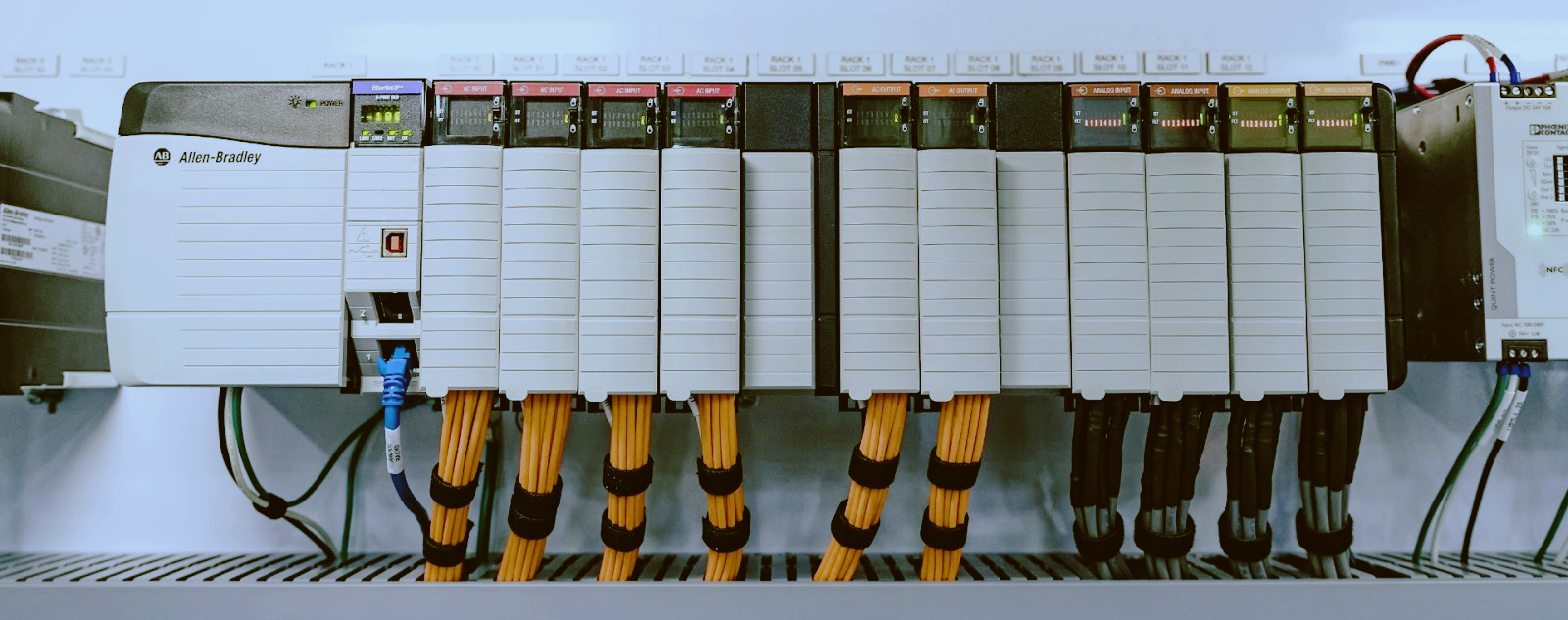

MicroLogix 1400 Troubleshooting: Common Field Faults and the 2026 Buying Reality
Aug 12, 2026
Thirty years on shop floors. Twenty of them staring at Allen-Bradley small PLCs. The MicroLogix 1400, the 1766 series, is the last of the old MicroLogix line still in production, and I still see it in panels every week. Packing machines. Water treatment. Conveyors. HVAC plants. It is a workhorse, and it fails in the same handful of ways over and over.
This is the stuff I actually fix on the job. The real faults, ranked by how often I see them, the causes, and the fix. Plus when to stop fixing and swap in a spare, and the 2026 buying situation, because that part affects every plant that runs these units.
What You're Actually Working With
The MicroLogix 1400 comes in six common catalog numbers: 1766-L32BWA, 1766-L32BWB, 1766-L32BXWE, 1766-L32AWAA, 1766-L24BWA, and 1766-L24BWB. The L32 units have 32 I/O, the L24 units have 24. The letter codes at the end tell you the power supply and the I/O mix. Same brain inside, different power and I/O. When you order a spare, the number on the side of the dead unit is the number you want on the replacement.
The 1400 has an LCD screen and a keypad on the front, a built-in Ethernet port, and a serial port. You program it with RSLogix 500, and Rockwell still gives away a lite version, so you do not need a paid license to babysit a 1400.
The front panel tells you a lot before you plug in a laptop. The LCD shows alarms. The LEDs along the top show power, run, fault, comm activity, and battery. Learn what those LEDs mean and you have solved half your problems. Half the calls I get start with "the machine just stopped" and end with a five-second look at the front panel.
The Five-Minute First Check
Before you pull the unit, do the five-minute check. I do it every time, and it catches more problems than any fancy diagnostic.
Power first. Check the power LED and the supply voltage at the terminals with a meter. I have seen a 1400 "dead" because a loose terminal or a tripped breaker took out the feed. The PLC was fine the whole time.
Check the fuses. Some 1400 models have a user-replaceable fuse. A blown fuse takes out a whole section of I/O and looks exactly like a dead output or a dead input.
Check the keyswitch. The 1400 has a three-position keyswitch on the front: RUN, REM, and PROG. If somebody left it in PROG, the machine will not run. It happens all the time after a download, and the operator calls at 6 a.m. because the line will not start.
Check the fault LED and the LCD message. The LCD tells you the fault code. Write it down. That message is worth more than a week of guessing. Then check the wiring, especially the commons. A missing common wire on an input bank makes every input in that bank read dead, and it is not a PLC fault at all.
Grounding too. These units live in panels full of contactors and VFDs. If the PLC drops communication every time a motor starts, suspect noise and grounding before you suspect the PLC.
The Battery Problem and the Program Loss Nightmare
This is the big one. The one that shuts down a production line on a Friday afternoon. The MicroLogix 1400 uses a 3-volt lithium battery, part number 1766-BAT, behind the little door on the front of the unit. It keeps the real-time clock alive and keeps retentive data alive when the power is off. Timer current values, counter accumulators, recipe registers, all of that lives on that battery.
The battery lasts two to five years. Cold, clean panels get closer to five. Hot, dusty panels get two. And nobody changes it on a schedule, because it is out of sight, and then one day the machine starts acting wrong.
What you see. The BAT LED on the front flashes. The LCD shows "BATT" in the alarm area. Sometimes the machine keeps running and nobody notices until the battery is completely flat. That is the dangerous one. The clock resets, retentive data goes to zero, and the machine starts up in a state nobody planned for.
What causes it. A dead battery, plain and simple. Nine times out of ten it is age. The other time, it is a unit that sat on a shelf for years before installation, so the battery was already half gone on day one.
The fix. Change the battery. Do it with power on if you can, or at least with a backup of the program already saved to a PC. Open the door, unplug the old battery, plug in the new one, close the door. Thirty seconds of work. The 1766-BAT is cheap. Keep one in the panel, right next to the spare fuse. tztechio carries the 1766-BAT along with the rest of the Allen-Bradley spare parts.
Everybody asks about program loss. The program lives in flash memory, so it usually survives a dead battery. What you lose is retentive data and the clock. But do not relax too much. I have seen whole programs come up empty after battery failures, usually because the program was never saved to flash cleanly or a bad download corrupted it right before the battery gave out. The lesson is the same either way: back up the program before the battery dies, not after.
When it is not the battery. If you replace the battery and the alarm stays, check the battery connector. I have seen corroded contacts on units in humid plants. Clean the contacts, reseat the battery. If it still shows a battery fault with a fresh battery, the backup circuit on the board has a problem, and that is a replace-the-unit situation, not a repair.
Channel 0 Communication Issues
Channel 0 is the RS-232 serial port on the 1400. It is how you talk to the PLC with a laptop, how it talks to a PanelView, and how it talks to a pile of third-party gear. It is also the source of a thousand headaches, and almost all of them are settings, not hardware.
What causes it, most common first.
First, wrong DF1 driver settings in RSLinx. The driver has to match what the 1400 expects: baud rate, parity, node address. The 1400 defaults to DF1 full-duplex at 19200 baud. If somebody changed the baud in the processor and did not change RSLinx, you get nothing but silence.
Second, the wrong cable or a damaged cable. DF1 uses null-modem wiring on the 9-pin connector. A straight-through cable that works fine for something else will not work here.
Third, somebody changed the channel configuration to a different protocol. The 1400 can run DF1, Modbus RTU, or ASCII on Channel 0. If the last guy left it in Modbus mode and you are trying to program through it, it will not talk to RSLinx.
Fourth, the device on the other end has a different baud or parity. Both ends have to agree on every parameter. One bit off and it is silence.
The fix. Check settings before you check hardware. That is the rule. In RSLinx, set the driver to RS-232 DF1, pick the right COM port, set the baud and parity to match the processor. Use auto-configure if you do not know the processor settings. Then check the cable. Then check the other device's settings. Nine times out of ten it is one of those three, and it costs nothing to fix.
Passthrough is a separate chapter. If you have a PanelView hanging off Channel 0 and you want to reach the PLC through it, passthrough has to be enabled in both devices, and the DF1 node addresses have to be right. When passthrough stops working, it is almost always because somebody changed a node address or passthrough got disabled during a download. Re-enable it, set the addresses, and it comes back.
Channel 1, the Ethernet port, is usually more reliable, and most modern 1400 installs talk to the PLC over Ethernet for programming and HMI. If you have a choice, use Ethernet. When Ethernet gives you trouble, check the basics: static IP address, subnet mask, and whether the address collides with something else on the plant network.
LCD Display Problems
The LCD on the front of the 1400 is a convenience, until it stops working, and then it is a problem, because the alarm messages live on that screen.
What causes it. For a washed-out display, it is usually contrast. The 1400 lets you adjust contrast from the front panel menu. On a hot panel, or an old unit, the contrast drifts. Before you condemn the screen, adjust it. I have "fixed" a dead-looking display with three button presses more than once.
Dead pixels and missing rows are physical damage to the LCD module. Nothing in the menu fixes that. Backlight failure is the same: the screen goes dark but the PLC runs fine. You can run it blind, but that is a bad idea on a production machine, because the alarm messages are exactly what you cannot see.
The fix. Adjust contrast first, always. A display with dead pixels is not repairable in the field. The LCD module is part of the front assembly, and you are not swapping it on the bench without a lot of pain. If the display is gone and the machine needs an operator interface, that is a strong reason to replace the unit. A replacement 1766 series unit and an hour of work puts you back in business.
Blown Outputs
Outputs die. It is physics. The 1400 comes with relay outputs on most models and transistor outputs on some. Both fail for predictable reasons.
What causes it, ranked.
A shorted or overloaded load is number one. The output was sized right on paper, but the load drew more than the rating, and the relay contacts welded or the transistor let the smoke out.
Inductive kick is number two. A relay contact switching a solenoid or a contactor without a flyback diode or surge suppressor across the load. The back-EMF eats the contacts. This is the one I see most on machines that have been "modified" over the years.
High cycle count is number three. Relay outputs have a mechanical life. A relay output cycling a valve every few seconds wears out. That is not a defect, that is wear.
Wiring mistakes are number four. Somebody landed a 120V load on a 24V transistor output, or shorted a terminal during a repair. Instant death, and usually a smell to go with it.
The fix. Verify the output is actually dead before you blame it. Force the output on in the program and check voltage at the terminal with a meter. If the bit is on and there is no voltage at the terminal, the output is dead. Then check the load, because a welded contactor coil will kill the replacement output too. Fix the load first.
Here is the part nobody wants to hear. On the 1400, the embedded outputs are soldered to the main board. There is no output card to swap. If a base output blows and you have no spare channel to rewire to, the unit is done. That is why I always tell people to keep a spare 1400 in the store room.
Prevention beats replacement. Run heavy loads through an external contactor or an interposing relay, so the PLC output only drives the coil. Add flyback diodes on DC loads and RC snubbers or MOVs on AC loads. That one habit doubles the life of the outputs.
Modbus RTU Setup Problems
The 1400 speaks Modbus RTU on Channel 0, both master and slave. It is a big reason these units are still around, because they talk to VFDs, power meters, and third-party panels that speak Modbus. It is also a steady source of phone calls.
What causes it. The usual suspects. Wrong baud or parity on one end. Wrong node address. Wrong register mapping, where the request points at a Modbus address that does not line up with the data file you think it does. And wiring, especially two-wire versus four-wire RS-485, plus missing termination resistors on a long run.
The fix. Go end to end. Node address first: both ends have to agree. Then baud and parity: same on both ends, and 8 data bits, no exceptions. Modbus RTU is always 8-bit. Then wiring: check A and B, check the shield, check the termination. Then the register map: the Modbus address you are reading has to line up with the data file in the 1400. That is where most of the real debugging happens, and it is a paper exercise, not a hardware one. Once the wiring and settings are right, the error codes on the MSG instruction will usually tell you exactly what is wrong.
Firmware Corruption After a Bad Download
This one scares people, and it usually should not. A download that gets interrupted, a power blip during a firmware update, a laptop that dies mid-transfer. The 1400 ends up with a corrupted program or corrupted firmware, and it will not run.
What causes it. An interrupted download, a power loss during a firmware flash, or a bad firmware file. Also a dying battery at exactly the wrong moment. I have seen that one: the download starts, the battery gives out, the flash write gets interrupted, and the unit comes up half-dead.
The fix. Try the cheap stuff first. Cycle power. Put the keyswitch in PROG, power up, and try to connect. If RSLinx sees it, download the program again, completely, and cycle power. Most of the time that is it. If the unit will not talk at all, you are looking at firmware recovery, and that is a bench job. I have seen units come back from what looked like certain death with nothing more than a power cycle and a re-download.
If the flash is truly corrupted, the unit is done from a field standpoint. Do not throw it in the bin. Send it to a repair house that does board-level work. But do not hold the production line up waiting for it. Swap in a spare, ship the dead one out, and move on.
Fault Quick-Reference Table
Here is the table I wish somebody had handed me twenty years ago. Fault, likely cause, fix, and the spare part you will need.
Fault | Likely Cause | Fix | Spare Part
BAT LED flashing, "BATT" alarm on LCD | Battery low or dead. 1766-BAT, 2 to 5 year life | Replace battery with power on, verify alarm clears | 1766-BAT
Retentive data zeroed or program empty after power loss | Dead battery, no backup | Reload program from backup, set clock, re-enter retentive data | 1766-BAT plus saved program file
RSLinx cannot find processor on Channel 0 | Wrong DF1 settings, bad cable, wrong protocol | Check DF1 driver, baud, parity, cable, channel config | 1761-CBL-PM02 programming cable
PanelView passthrough dead | Passthrough disabled, wrong node addresses | Re-enable passthrough in both devices, set DF1 node addresses | None
LCD washed out | Contrast drifted | Adjust contrast from front panel menu | None
LCD dead pixels or blank, PLC runs | LCD module failure, not field repairable | Replace the unit | 1766-L32BWA or your model number
Output bit on, no voltage at terminal | Blown relay or transistor output | Rewire to a spare output or replace unit. Fix the load first | 1766 unit, flyback diode or MOV
Modbus MSG errors | Wrong node address, baud, parity, wiring, register map | Check both ends, wiring, termination, register mapping | None
Fault LED on, will not run after download | Interrupted download, corrupted firmware | Power cycle, re-download. Firmware recovery if needed | None
When to Replace the Unit Instead of Fixing
Some things on the 1400 are fixable in the field. Battery, settings, wiring, program. Some things are not. Learn the difference and you will stop wasting shift time.
Replace the unit when the LCD is dead and you need the operator interface, or when a base output is blown and you have no spare channel to rewire to. Replace it when the battery alarm will not clear with a fresh battery; that points at a board fault. Same for firmware corrupted past recovery. And replace it when the unit has been through years of heat, dust, and abuse, because old units fail in cascade. You fix the battery and the next week an output dies. That is the unit telling you it is done.
Fix it when it is a settings problem, and that is 70 percent of the calls I get. The battery is a fix, thirty seconds and twenty dollars. Wiring, a cable, a connection, all fixes. A program issue you can download over, that is a fix too.
Here is the rule I run by. If the fix costs more in labor than a spare unit costs, or if the machine cannot wait for a repair, swap the unit and debug the old one on the bench. Production time is worth more than any PLC ever made.
The 2026 Buying Reality
The part everyone asks about. Can you still buy a MicroLogix 1400 in 2026? The official answer is yes. Rockwell still lists the 1766 series as Active or Active Mature on its lifecycle status as of 2026. That is the official word. Check it yourself on Rockwell's product lifecycle page, because official status changes and you should look at it with your own eyes.
Here is the unofficial word. The rest of the MicroLogix family is already gone. The 1000 (1761), the 1200 (1762), the 1500 (1764), and the 1100 (1763) are all discontinued. As of 2022, the 1400 was the only MicroLogix you could still buy new. Distribution channels have been reporting component sourcing problems for years. The 1100 got hit first. The talk in the channel is that the 1400 could follow within two to three years. That is rumor, not official, but I have been in this game long enough to know that channel rumors about component shortages have a way of becoming official announcements.
Prices are already creeping up as stock depletes. The units out there are being bought up by people who know the platform is ending. If you run a plant full of 1400s, the smart play is to buy spares now, while they are still available and still priced like a normal part. Not next year. Now. The people who waited on the 1100 learned that lesson the expensive way.
Where do you buy? There are still distributors with stock, plus specialists in automation spare parts. tztechio carries MicroLogix 1400 units and 1766-BAT batteries as spares, along with a range of PLC spare parts. I would rather buy from a place that understands what these parts are for than gamble on auction sites, because a "new" PLC that has been sitting in a warehouse for ten years has its own problems, starting with a battery that is already dead.
A word on old stock. If you buy a new old stock unit, plan on replacing the battery before you install it. A battery that has been sitting for years is already half dead. And a 1400 stored in a damp warehouse can have corrosion issues. Test every unit you receive. Power it up, load a program, run it for a day before you trust it in a machine. That test costs you an afternoon and saves you a shutdown.
Replacement Paths: What Comes After the 1400
Know what is on the other side, because the day is coming when you will have to move off the 1400. There are two main paths, and neither is a drop-in swap. I will be straight with you about that.
The Micro800 family is one path. The Micro820 (2080-LC20-20QBB) and the Micro850 (2080-LC50-24QWB) are Rockwell's current small controllers. You program them with Connected Components Workbench, which is free. That is the good news. The bad news is that CCW is a completely different environment than RSLogix 500. Your ladder logic does not just port over. The instruction set is different, the way you handle data is different, and tag migration is manual. The Micro800s are good little controllers and the price is right, but do not believe anyone who tells you the migration is quick.
CompactLogix is the other path. If your machine needs more power, the CompactLogix 1769-L16ER-BB1B is the modern step up. It runs Studio 5000, which is a proper modern environment, and it is a much more capable controller. It is also a bigger jump. Different software, different license cost, different way of thinking about tags and tasks. The ladder logic needs a full review, line by line, because the instructions do not map one to one.
Either way, the move off the 1400 is a project, not an afternoon. That is exactly why the 1400 is still out there in the numbers it is. Plants do not migrate a platform because they are bored. They migrate when they have to. And until they have to, the 1400 keeps running, and the spares keep being worth buying.
My advice: keep the 1400s running as long as you can, buy your spares now, and start the migration conversation early, on one machine, before the platform forces it on you. And keep your RSLogix 500 backups safe. That software and those program files are worth more than the hardware at this point.
FAQ
Q: Does the MicroLogix 1400 lose its program when the battery dies?
A: The program is stored in flash memory, so it usually survives. What you lose is retentive data: timer and counter values, recipe registers, and the real-time clock. But I have seen programs come up empty after battery failures and interrupted downloads too. Back up the program to a PC before the battery dies, not after.
Q: How long does the 1766-BAT battery last?
A: Two to five years, depending on the environment. Hot panels kill it faster. Change it on a schedule, with power on, and keep a spare in the panel. It is a thirty-second job.
Q: Can I still buy a new MicroLogix 1400 in 2026?
A: Officially yes. Rockwell still lists the 1766 series as Active or Active Mature as of 2026. Check their lifecycle page yourself, because that status changes. But the channel is already reporting sourcing problems and prices are climbing. If you need spares, buy them now.
Q: What replaces a MicroLogix 1400?
A: The Micro800 family (Micro820, Micro850) with free Connected Components Workbench software, or a CompactLogix 1769-L16ER-BB1B with Studio 5000 for more power. Neither is a drop-in swap. Your ladder logic gets re-written and reviewed by hand.
Q: Can I program a MicroLogix 1400 for free?
A: Yes. The lite version of RSLogix 500 handles the MicroLogix line and it is free. You can also do online edits with it, which is a lifesaver on a running machine.
Q: Why can't my laptop talk to the 1400 on the serial port?
A: Start with the DF1 driver settings in RSLinx, then the cable, then the channel configuration. Wrong baud, wrong parity, or a straight-through cable instead of a null-modem will all give you silence. Settings before hardware, every time.
Q: Can the 1400 talk Modbus?
A: Yes. It does Modbus RTU master and slave on Channel 0. Check node address, baud, parity, and register mapping on both ends. Modbus RTU is always 8 data bits, no exceptions.
Final Word
The MicroLogix 1400 is old, and it is not getting younger. But it is still alive, still supported, still available, and running production lines all over the world. Most of its faults are predictable, and most of them are cheap to fix. Battery, settings, wiring, backups. That covers most of what I see in a year of service calls.
The one thing you cannot fix is time. The platform is on borrowed time, and the clock is ticking on buying spares at sane prices. So do the boring stuff: keep backups, keep a 1766-BAT in the panel, keep a spare unit in the store room, and keep your eye on the lifecycle page. When the day comes, you will be ready, and the machine will not miss a beat.
That is the whole job, and it is the same job it has always been. Keep the line running.
URL Slug: allen-bradley-micrologix-1400-troubleshooting
--------------------------------------------------------------------------------------------
🏢 About TZ Tech
TZ Tech is a leading supplier of industrial automation, electrical, instrumentation, and telecommunications components. We specialize in sourcing ready-to-ship distributor stock, allowing us to offer highly competitive pricing and short lead times. Thanks to our extensive inventory, we can even source rare and discontinued parts that are hard to find elsewhere.
🛡️ Our Quality Commitment
We understand that quality is your top priority. Every component undergoes a strict screening and inspection process so you can buy with absolute confidence. For legacy or discontinued parts, we believe in complete transparency and will always provide an honest, accurate report on the product's condition. Plus, all brand-new parts come backed by a full 1-year warranty.
✉️ Get in Touch
Have a project or a part you need? Send us your inquiry today! Our team is dedicated to providing a fast response within 6 hours (excluding weekends).