
Beckhoff TwinCAT 3 Programming: A Practical Guide for Engineers Switching from Traditional PLCs
An engineer who spent ten years writing ladder logic on Allen Bradley and Siemens platforms opens TwinCAT 3 for the first time and freezes. The project tree sits inside Visual Studio. C++ files share space with PLC code. There are no chassis slots to configure, no hardware catalog to browse. The real-time kernel installs as a Windows driver alongside your web browser. This is Beckhoff TwinCAT 3 programming — a software-first approach to industrial control. The transition stings, but the payoff is a platform with capabilities no traditional PLC can match.
TwinCAT 3 (The Windows Control and Automation Technology) turns any Windows PC into a real-time PLC and motion controller. Unlike traditional platforms where the runtime lives on proprietary hardware, TwinCAT 3 isolates dedicated CPU cores from Windows via a real-time kernel driver — bare-metal scheduling, not virtualization.
The engineering environment, TwinCAT 3 XAE, integrates into Microsoft Visual Studio as a shell extension. The PLC project lives inside a standard .sln solution. Source control works through Git. Multiple programmers can work simultaneously. For engineers accustomed to Studio 5000 or TIA Portal, the IDE feels like a software development environment — because it is one.
The architecture breaks out of the IEC 61131-3 sandbox entirely. C++ and MATLAB/Simulink modules compile as native real-time tasks alongside PLC code, sharing memory directly through TcCOM (TwinCAT Component Object Model). The fieldbus is EtherCAT — Beckhoff's deterministic protocol that daisy-chains thousands of I/O terminals on a single cable with sub-millisecond cycle times. No PROFINET device naming, no GSDML files, no third-party drive configuration tools.
The software stack: TwinCAT 3 XAE (engineering), TwinCAT 3 XAR (runtime execution), and the real-time kernel. Development is free. You can write, compile, and simulate full machine programs on an ordinary laptop with zero Beckhoff hardware.
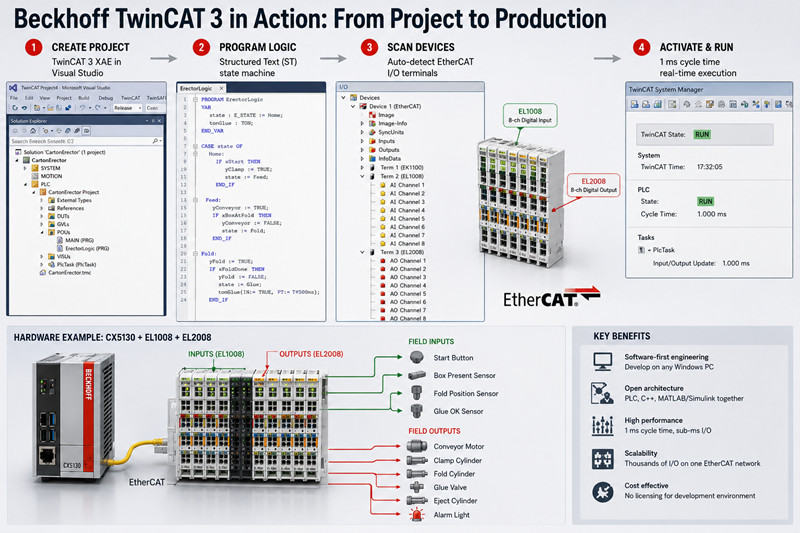
A packaging integrator in Jeddah deployed a carton erector control system using a CX5130 embedded PC, EL1008 8-channel digital inputs, and EL2008 8-channel digital outputs. The entire project — install to cycling outputs — took one afternoon.
Step 1 — Install TwinCAT 3 XAE. Download from Beckhoff's website. The installer drops a TwinCAT toolbar into Visual Studio and installs the real-time kernel driver. VS 2017, 2019, and 2022 shells are all supported.
Step 2 — Create a project. File → New → Project → "TwinCAT Project." The solution contains a PLC node, SYSTEM node for real-time configuration, and an I/O node for EtherCAT devices. Target x86 for embedded PCs like the CX5130, x64 for newer IPCs.
Step 3 — Choose programming language. Right-click the PLC node, add a PLC project. Beckhoff defaults to Structured Text (ST), and most programmers migrate there because ST handles arrays, state machines, and complex logic far more cleanly than ladder. That said, Continuous Function Chart (CFC) — a free-form graphical language where you place blocks on a canvas and draw signal wires — is uniquely suited to process control loops. Ladder Logic (LD) remains available for discrete interlocks that maintenance teams need to troubleshoot.
For the carton erector, the engineer wrote a state machine in ST with states for Home, Feed, Fold, Glue, and Eject. Each state assigned outputs to the EL2008 and read inputs from the EL1008.
Step 4 — Scan EtherCAT devices. Right-click "Devices" in the I/O tree, select "Scan." TwinCAT 3 discovers every connected terminal, drive, and I/O slice automatically. EL1008 appears as an 8-channel input terminal. EL2008 appears as an 8-channel output. Link terminal channels to PLC variables by dragging them into your variable declaration.
Step 5 — Activate configuration. Click "Activate Configuration" in the toolbar. TwinCAT 3 compiles the PLC code, builds the real-time config, and loads everything onto the runtime. Press "Login," select "Run Mode," and the CX5130 runs PLC logic at the configured cycle time — typically 1 ms.
The only hiccup: the laptop couldn't reach the CX5130 because the AMS NetID wasn't routed. Adding the laptop's NetID via the TwinCAT router tool (taskbar icon) resolved it in under two minutes.
The feature that separates TwinCAT 3 from every traditional PLC platform: native C++. You add a C++ module directly to the real-time project, write standard C++ with real-time extensions, and it runs as a TcCOM object on the same isolated core as the PLC — sharing memory through pointers with zero latency overhead.
A German packaging OEM used this to run an OpenCV-based bottle cap inspection at 400 ppm. The C++ vision module exchanges pass/fail results with the PLC state machine via a shared struct. A traditional approach — external IPC over OPC UA — would add 10-50 ms of latency and an entire extra network link to maintain.
The TE1400 target exports Simulink models as TcCOM modules. A process engineer designs a PID cascade, clicks "Generate Code," and the model compiles to a real-time object in the TwinCAT 3 project. The PLC programmer maps model inputs and outputs to real I/O terminals. A UAE water treatment plant used this for a coagulation dosing algorithm — turbidity and pH sensors wired to EL3024 analog inputs, model output driving EL4024 analog outputs to dosing pumps. Total integration: one day.
NC PTP handles standard point-to-point positioning with trapezoidal or S-curve profiles — conveyors, linear actuators, rotary positioning. TwinCAT CNC is a full numerical control kernel supporting G-code, 5-axis kinematics, tool radius compensation, and look-ahead. An Italian CNC shop runs 5-axis machining on TwinCAT CNC with AX5000 servo drives at 0.1 ms interpolation cycles.
TwinCAT HMI (TE2000) serves HTML5/JavaScript dashboards from the Beckhoff IPC. Any browser-equipped device — panel PC, tablet, smartphone — displays the same screens. Communication between the HMI server and PLC uses ADS over the local AMS router with sub-millisecond latency. No proprietary panel hardware required.
TwinCAT 3 pins individual tasks to specific isolated cores with preemption disabled. A typical quad-core CX2040 layout: Core 1 runs the PLC state machine at 1 ms, Core 2 runs NC PTP at 0.5 ms, Core 3 runs a C++ vision module at 5 ms, and Core 0 handles Windows. If any real-time task exceeds its cycle, TwinCAT reports a violation and enters a configurable error state. For high-speed packaging or CNC interpolators, manual core isolation eliminates jitter that would destabilize the machine.
TwinCAT 3 licenses are one-time purchases per target device. TC1200 (PLC-only, IEC 61131-3) is approximately $700 for a CX5130. TC1250 adds NC PTP motion. TC1300 unlocks C++. The full suite on a CX2040 runs $3,000-$4,000. The engineering environment is free for development and simulation.
Embedded PCs: CX7000 (~$400 entry-level), CX2000 series ($1,500-$4,000), C6030 ultra-compact IPC ($2,000+). I/O terminals like EL1008 and EL2008 run $80-$120 per module. Standard catalog lead times run 1-3 weeks.
Browse Beckhoff embedded PCs, EtherCAT terminals, and licensing and PLC solutions at tztechio.com.
Q: Can I run TwinCAT 3 on a regular laptop for development?
Yes. TwinCAT 3 XAE installs on any Windows 10/11 x64 machine. The real-time kernel runs in local mode using isolated CPU scheduling. You can write, compile, and simulate full PLC, C++, and motion programs without Beckhoff hardware. For I/O simulation, write a short ST routine generating sensor feedback. For motion, enable axis simulation mode in SYSTEM configuration.
Q: Is TwinCAT 3 harder to learn than Studio 5000 or TIA Portal?
The Visual Studio environment adds a learning curve if you've only used dedicated PLC IDEs. But the I/O scanning workflow is simpler than TIA Portal's hardware catalog, and engineers familiar with structured text and basic software practices (version control, debugging, variable scoping) typically find TwinCAT 3 intuitive within the first week. Beckhoff's F1 help is thorough and context-aware.
Q: Do I need a Beckhoff IPC, or can I use a third-party PC?
The runtime works on any x86 Windows PC, but Beckhoff validates real-time behavior only on its own hardware. Third-party PCs risk jitter from chipset, BIOS power management, or driver issues. Develop and simulate on any laptop. For production, use Beckhoff IPCs — the cost difference is negligible compared to debugging non-validated hardware.
Q: Can I mix ladder logic and structured text in the same project?
Yes. A single PLC project can contain PRGs, FBs, and FCs in any combination of ST, LD, FBD, and CFC. A ladder routine can call an ST function block. A CFC diagram can reference ladder networks. Compilation and linking are language-agnostic.
Q: Does TwinCAT 3 support OPC UA and MQTT for Industry 4.0?
Yes. TF6100 provides OPC UA server functionality exposing PLC symbols as configurable nodes. TF6701 adds MQTT publish/subscribe. Both run as TcCOM modules on the real-time side, independent of Windows services.
Q: How are firmware and software updates handled on a running machine?
TwinCAT 3 supports online changes — modify PLC code, add variables, adjust task config while the runtime stays in Run mode. Structural changes (new EtherCAT devices, cycle time modifications, C++ modules) require an "Activate Configuration" with a brief controlled restart. For 24/7 processes, redundant TwinCAT configurations with automatic failover are available.

Please read on, stay posted, subscribe, and we welcome you to tell us what you think.


Sitemap | Blog | XML | Privacy Policy
In addition, with your permission, we want to place cookies to make your visit anointeraction with slOC more personal. For this we use analytical and advertisingcookies. With these cookies we and third parties can track and collect yourinternet behawior inside and outside super-instrument.com. With this we and third parties adapt super-instrument.com and advertisementsto your interest. By clicking Accept you agree to this. If you decline, we only usethe necessary cookies and you unfortunately will not receive any personalizedcontent. Please visit our Cookie policy for more information or to change yourconsent in the future.
Accept and continue Decline cookies