
S7-200 PLC Field Guide: The Faults a Veteran Technician Keeps Fixing
Last month I drove two hours to a feed mill because a dock leveler had stopped listening to its push buttons. The plant electrician had already told the boss the PLC was dead and they needed a whole new control system. I opened the panel, saw the little brick with the Siemens name on it, and got out my programming cable before I touched a meter. Twenty minutes later the leveler was cycling on its own. The CPU 224 was fine. The 24 V supply feeding the buttons had quit at lunchtime, and nobody had checked it because everybody was sure the PLC had died.
That panel is the whole S7-200 story in one box. Siemens stopped selling these as new products more than a decade ago, and in 2026 there are still tens of thousands of them running pumps, gates, small packaging lines, HVAC skids and conveyor helpers all over the Middle East, the Americas and Europe. I have replaced more of these than I can count, and I have fixed ten times more than I replaced. Most of the faults are boring, predictable, and fixable in an afternoon with a meter, a screwdriver, and an old laptop running STEP 7 Micro/WIN.
If you keep old plants running, this article is for you. I am not going to explain what a PLC is or how to write ladder logic. I am going to tell you what actually breaks on an S7-200 after ten or twenty years in a panel, how I find it, how I fix it, and what I stock so I do not have to scramble. When you do need a replacement CPU in a hurry, places like the PLC section at tztechio carry the old stock, but you want to know what you are buying before you buy. That comes later. First, the machine itself.
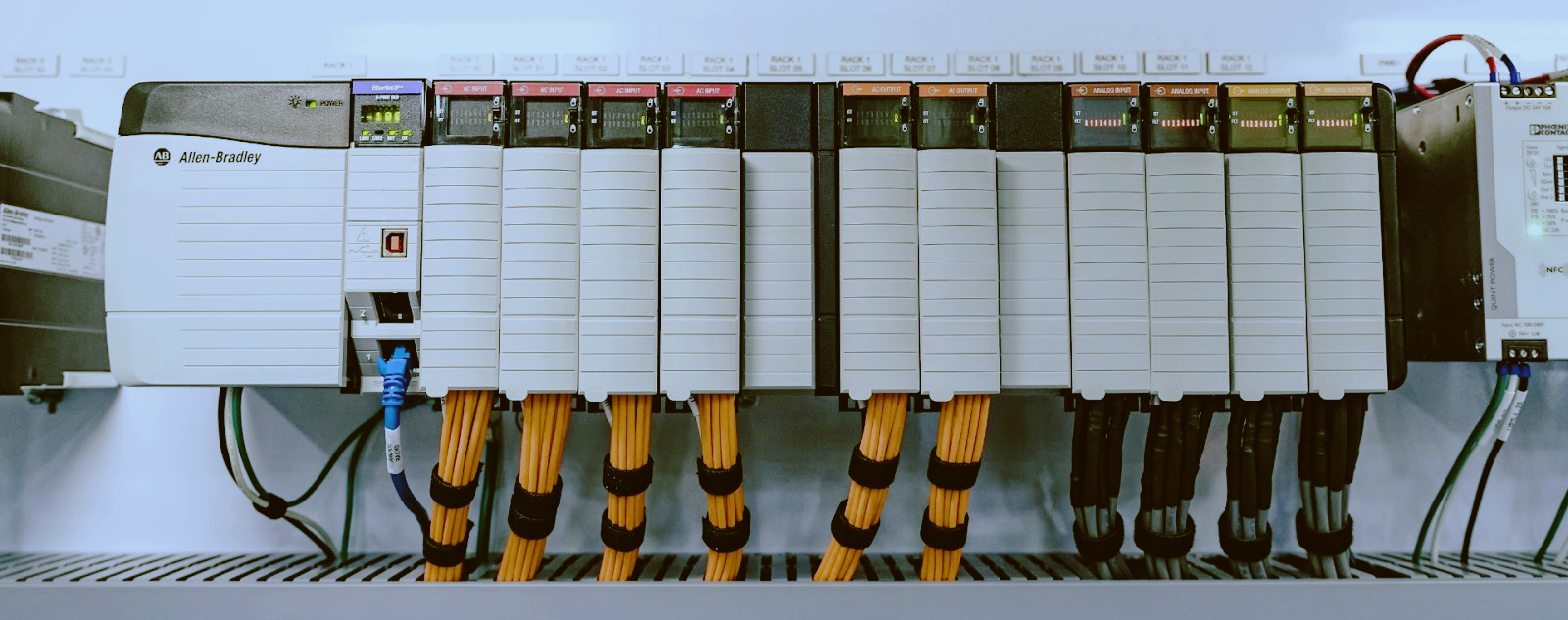
The S7-200 came out in the middle of the 1990s as Siemens's answer to the little brick PLCs that were taking over small machines. It was cheap, it was tiny, and it did exactly one job. The later CPUs in the family, the 221, 222, 224, 224XP and 226, shipped from the late 1990s through the early 2010s, and they ended up inside an unbelievable number of machines.
Three things keep it alive in 2026. First, the program does not live in battery-backed RAM like a lot of PLCs from that era. It lives in EEPROM on the CPU itself. No battery, no supercap, no memory that evaporates when the power goes off. You can pull a CPU 226 out of a machine, leave it on a shelf for five years, put it into another machine, and the old program is still sitting there waiting. Second, the software to program it, STEP 7 Micro/WIN, was free, and every maintenance electrician over the age of forty has a copy on an old laptop somewhere. Third, the whole family is cheap to replace from surplus stock, and the machines it runs are usually not worth re-engineering.
Add all that up and you get a PLC that refuses to die. The machines around it wear out, the contactors wear out, the motors wear out. The little green brick just keeps scanning. When it does stop, the cause is usually around the CPU, not inside it.
You need to know the family before you can diagnose it. Here are the five CPUs you will actually meet, with the order numbers you will see on the surplus market. The letters in the middle of the order number tell you the power supply and output type, and I never bothered to memorize that code. I read the sticker on the side of the CPU and the rating plate on the panel door.
CPU | Common order numbers you will see | Onboard I/O | Expansion | PPI ports
CPU 221 | 6ES7211-0AA23-0XB0 and 6ES7211-0BA23-0XB0 | 6 in / 4 out | none | 1
CPU 222 | 6ES7212-1AB23-0XB0 family | 8 in / 6 out | 2 modules | 1
CPU 224 | 6ES7214-1AG40-0XB0 (later two-port version), earlier 6ES7214-1AD23-0XB0 family | 14 in / 10 out | 7 modules | 1 or 2
CPU 224XP | 6ES7214-2BD23-0XB0 (DC/DC/DC), 6ES7214-2AD23-0XB0 (AC/DC/relay) | 14 in / 10 out plus 2 analog in and 1 analog out on board | 7 modules | 2
CPU 226 | 6ES7216-2BD23-0XB0 (DC/DC/DC), 6ES7216-2AD23-0XB0 (AC/DC/relay) | 24 in / 16 out | 7 modules | 2
The 221 is the little one with no room to grow. The 222 is the starter brick. The 224 is the one you find in nine panels out of ten. The 224XP is the favorite of machine builders because it has two analog inputs and an analog output built in, which saves a module and a wiring nightmare. The 226 is the big brother with forty points of I/O, and it is the one I tell people to stock as a spare because it replaces almost anything in the family with room to spare.
Now the part that surprises people. The program is stored in the CPU's EEPROM, so it survives power loss and shelf time without any battery. The real-time clock and the retentive data are a different story. When the power is off, the clock and the retentive memory are kept alive by a supercapacitor, the little gold cylinder inside the CPU. On a fresh unit that supercap holds things for a few days, maybe a week. On a twenty-year-old CPU it might hold them for an afternoon. The optional battery cartridge, order number 6ES7291-8BA20-0XB0, stretches that to months for the CPUs that take it, which means the 224, 224XP and 226.
Here is the sentence I repeat to panicking plant managers: a dead clock does not lose the program. Ever. I have walked into plants where the CPU had been dead for a year, the clock showed 2003, and the machine ran perfectly the moment power came back. The clock reset, the counters zeroed, and the program was right where it always was. Keep that in your head, because half the faults below look like they killed the program and almost none of them actually do.
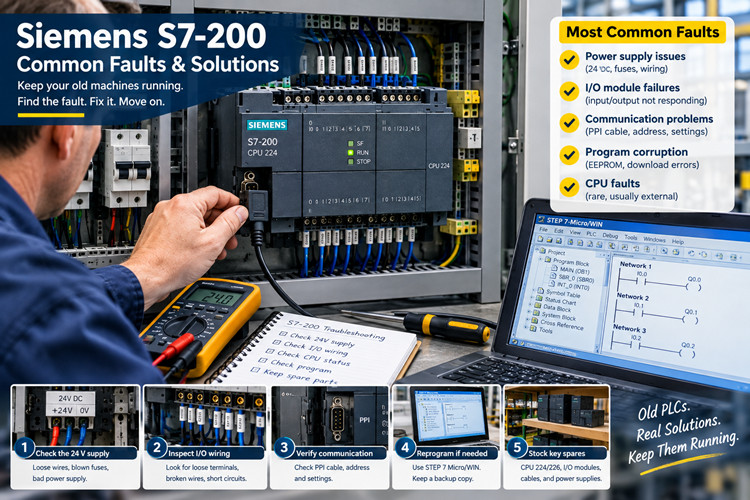
This list is ordered by how often I see each fault in the field, not by how interesting it is. The boring ones are at the top because they are the ones that cost you production.
This is number one by a wide margin, and it is the one that embarrasses electricians who tell the boss the PLC died. The DC-powered CPUs, the ones with DC/DC/DC in the name, need a clean 24 V DC supply between 20.4 and 28.8 V on the L+ and M terminals. They do not make their own power. When that external supply sags, dies, or gets set wrong, the CPU does strange things. It drops outputs, it forgets where it was, and if the supply is noisy enough it throws itself into STOP.
I also see the reverse. The AC-powered CPUs, the AC/DC/relay versions, have a switched-mode supply built in, and after fifteen years the capacitors in that supply dry out. The CPU starts resetting itself when a contactor pulls in, or it refuses to start at all. The tell is the smell and the bulged cap when you pull the board, and the fix is usually a replacement CPU, because recapping an S7-200 supply is not worth your time.
Then there is the onboard 24 V sensor supply. The CPU feeds a small amount of 24 V out to power your sensors, and when somebody shorts a sensor cable or overloads that little supply, the regulator dies. The CPU keeps running its logic, but every input that depended on that supply goes dead at once. The machine acts possessed. The first thing I check on any S7-200 with a handful of dead inputs is whether the sensor supply voltage is present at the terminals. It is amazing how often that is the whole fault.
Fix it by measuring first. Check voltage at L+ and M right on the CPU terminals with a load connected, not open circuit. A supply that reads 24 V with nothing on it can sag to 18 V the moment sensors and an output card start drawing. Set the supply to 24.5 V and leave it alone. If the CPU's onboard sensor supply is dead, replace the CPU or move the sensors to a separate 24 V supply, because that regulator is not field repairable.
Prevention in one line: feed the CPU from a real 24 V industrial supply, fuse the field wiring separately, and never share the CPU supply with solenoids, brakes, or anything that makes a voltage spike when it lets go.
The DC/DC/DC CPUs switch 24 V DC through transistor outputs. Those outputs are rated around three quarters of an amp, and they are not forgiving. The classic killer is a short to ground on the field wire, which is easy to do when the output feeds a solenoid that lives in a wet area or a junction box full of oil. The transistor dies instantly, and the CPU carries on like nothing happened.
The symptom is specific. The output LED on the front is lit, the program is running, the output bit is on, and there is no voltage at the terminal. That combination, LED on and terminal dead, is a blown transistor, not a program fault. I have seen people replace a whole CPU and rewire a machine because they chased the program for a day when the answer was a dead output on a $20 relay that should have been there in the first place.
The second killer is inductance. Solenoid valves, brake coils, small contactors, all of them kick back a voltage spike when the current is cut. If there is no flyback diode across the coil, those spikes punch through the output transistor a little bit at a time, and one day the output just stops. I have opened panels where every single output on the CPU was dead and the machine had been running for years on luck.
The fix is to verify with a meter and then make a decision. Confirm the output terminal has nothing while the LED is lit, check for a short on the field wire, disconnect the load, and see if the output comes back. It will not, because the transistor is gone. Move that load to a spare output if you have one, or replace the CPU, and put the load on an interposing relay before you power up again.
Prevention in one line: anything that is not a small, clean DC load gets an interposing relay, and every DC coil gets a flyback diode wired right across its terminals.
Every S7-200 job starts with a programming connection, and the comms setup is where old electricians go gray. The CPU speaks PPI on a 9-pin RS-485 port. You talk to it through a programming cable, and the cable is half the battle.
The old RS-232 PC/PPI cable, order number 6ES7901-3CB30-0XA0, plugs into a real serial port on the computer. Real serial ports have mostly vanished, which is why that cable now lives in a drawer next to a Windows XP laptop. The USB-PPI cable, order number 6ES7901-3DB30-0XA0, is the modern answer, but it brings its own circus. The genuine Siemens USB cable needs the PC Adapter USB driver installed before Windows will even see it, and Micro/WIN needs to be pointed at the right COM port, which changes every time Windows decides to renumber your USB ports. The cheap clone cables from online marketplaces need their own drivers and a prayer.
When Micro/WIN says it cannot find the CPU, work the list in order. Check Device Manager and confirm which COM port the cable actually landed on. Check the PPI parameters in Micro/WIN and set the address to 2 and the baud rate to 9.6 kbps, which is what a virgin CPU expects. Unplug every other USB serial device so Windows stops shuffling port numbers. Power-cycle the CPU with the cable connected. Try the other PPI port if the CPU has two, because a dirty or damaged port 0 will fail while port 1 talks fine.
And remember what software you are dealing with. STEP 7 Micro/WIN was last updated around 2010, and it was never happy on modern Windows. In 2026 my programming laptop is an old machine running Windows 7 32-bit, and I have Micro/WIN SP9 in a virtual machine as a backup. If you fight with a 64-bit Windows 10 machine for more than an hour, stop. Get the old laptop out of the truck. You will save your afternoon.
Prevention in one line: own one known-good USB-PPI cable, keep it with the laptop that has Micro/WIN already working, and write the COM port number on a sticker so you stop re-discovering it every visit.
The PPI port is RS-485 on pins 3 and 8, and it is only as tough as the little driver chip behind it. The ways I have seen those chips die: somebody wired the cable while the panel was live, somebody ran the PPI cable in the same conduit as motor cables for fifty feet, somebody dropped 24 V into the port during a wiring mistake, and lightning took a hike down a long outdoor run and stopped at the CPU.
The symptom is clean. The machine runs fine, the program is fine, and you simply cannot communicate on that port. If the CPU has a second port, the same cable works perfectly on it, and that confirms the port is dead, not the CPU.
The fix is harsh and simple. The port is not field repairable. On a two-port CPU like the 224XP or the 226 you move the HMI or the programming connection to port 1 and keep running. On a single-port CPU, or when both ports are gone, you replace the CPU. That is why I carry a spare 226 in the truck, because it has two ports and it drops into most jobs.
Prevention in one line: never plug or unplug the PPI cable with power on the port, keep serial wiring away from power cables, and put a surge suppressor on any PPI run that leaves the building.
The phone call goes like this. The machine sat dead for six months while a project stalled. Somebody finally powered it up and the machine did nothing. The plant electrician announces that the battery died and the program is gone, and can we come reprogram it from scratch.
Stop right there. Nine times out of ten the program is fine. It is in EEPROM, remember? The EEPROM does not need the battery. What actually happened is that the supercap went flat during those six months, so the retentive data came up empty. Recipe values, counter totals, timer presets that were written to retentive memory, calibration numbers, all of it read as zero at power-up. The program ran, and the machine did nothing sensible, because all its numbers were gone. That looks exactly like a lost program to a man who has been up since five in the morning.
First check the RUN LED. If the CPU is scanning, the program is in it. Then connect Micro/WIN and upload the program from the CPU, because the S7-200 will happily hand its program back to you. Save that upload as a .mwp file immediately, because that file is now your archive. Then write the program back to EEPROM so the copy in the CPU matches what you just saved. On the S7-200 the download stores the program block permanently on its own, no battery involved.
The cases where the program really is gone are rarer and they all have a story. Someone swapped in a spare CPU that had another machine's program in its EEPROM, and nobody checked. Someone ran a Clear command or held the CPU in a bad state during a download when the power hiccuped. Or someone inserted an EEPROM memory cartridge with an old program, and the CPU booted from the cartridge at power-up, which S7-200s do when a cartridge is present. In those cases the fix is the same upload path if anything is left to grab, and a clean download from your archive if there is not.
Prevention in one line: keep the .mwp file and a printed rung listing for every S7-200 you own, and label any spare CPU with the machine and program version that came out of it.
This one makes me smile every time because it is so easy. Every S7-200 has a little slide switch behind the front door with three positions: RUN, TERM and STOP. TERM means the CPU lets the programming software start and stop it remotely. STOP means the CPU will not run, period, and it will not run after a power cycle either, because the switch still says STOP.
I have been called to plants where the CPU was in STOP, the red SF light was doing whatever it does, and three electricians were convinced the program had been wiped. One of them had even ordered a replacement CPU. I slid the switch from STOP to RUN, the outputs picked up, and the machine started. The look on their faces was worth the drive.
Here is the field rule I teach apprentices. If the CPU is in STOP and you did not put it there, ask who was working on the panel last. Someone put it in STOP to do a download or a manual test and never put it back. Switch to RUN and watch. If it drops back to STOP on its own, then you have a real fault, and you read the diagnostics in Micro/WIN instead of guessing.
Also learn the LEDs while you are there. RUN green means scanning, STOP amber means stopped, and SF red means the CPU has a fault it wants to tell you about. Solid or flashing SF, plug in and read the error. The S7-200 keeps a small diagnostic buffer and it will tell you exactly what it does not like.
Prevention in one line: leave the switch in RUN or TERM when you close the door, and make it a habit to check the switch position before you diagnose anything else.
A lot of S7-200 machines talk to an operator through a Siemens text display, the TD200 or the later TD400. They are tough little panels and they outlive everything around them, but they do fail in one confusing way. The panel powers up, shows its logo or nothing, and then reports no communication with the CPU, even though the machine is running fine.
The part that trips people up: the TD200 does not hold its own communication settings in a menu. It gets its station address and baud rate from a configuration block that lives in the PLC program. When you download a program to the CPU, that program has to include the TD200 configuration, or the panel has nothing to talk to. I have seen a machine lose its text panel because somebody replaced the program with a version that did not include the panel configuration. The CPU ran fine. The panel sat there dark and confused.
Check the simple things first. Is the panel getting 24 V? Is the cable between the panel and the CPU intact, and is it plugged into the right port? If the CPU has one port and it is shared between the panel and the programming connection, remember that the TD200 and TD400 have pass-through connectors so you can daisy-chain the programming cable through the panel. If the plant rewired and put the panel on a dead port, you will see exactly this symptom.
Then check the program side. Open the TD200 configuration in Micro/WIN, confirm the address and baud rate match what the CPU expects, and download the blocks again. Power-cycle both the CPU and the panel after the download, because the panel picks up its settings at power-up. Nine times out of ten that brings the screen back to life.
Prevention in one line: when you save the archive for a machine with a text panel, make sure the TD configuration block is in the program and note it on the printout, because it is part of the program whether it looks like it or not.
The rarest fault on my list, but the scariest one. The SF LED comes on and Micro/WIN reports an EEPROM error or a checksum fault when you try to read the CPU. The program may run, may not run, or may run wrong.
What causes it: a power cut in the middle of a download, which is why you never let anybody kill a panel while you are programming. A brownout during the EEPROM write that happens at the end of a download. And the slow killer, a program that writes data to EEPROM constantly. The S7-200 lets you store V memory values permanently with a special write function, and EEPROM has a finite number of write cycles. I have seen a programmer put that write in a routine that ran every scan, and the CPU's EEPROM wore out in a couple of years. The CPU then forgot its program at random times, which is a special kind of nightmare.
The fix starts with a full download of all three blocks, program, system block and data block. Sometimes that is enough, because the error was a bad copy in memory and a clean write fixes it. If the CPU throws EEPROM errors again after a clean download, the EEPROM itself is tired, and you replace the CPU. That is also where you discover whether you kept the .mwp archive from fault five. If you did, you are back running in twenty minutes.
Prevention in one line: never interrupt a download, never let the plant cut power during programming, and never write to EEPROM from the program more than a handful of times a day, because that memory has a lifetime.
If you maintain more than two or three S7-200 machines, this is the spare parts list that has paid for itself many times over at my shop.
One spare CPU 226, the 6ES7216-2BD23-0XB0 DC/DC/DC version. It covers almost any machine in the family because it has the most I/O, two ports, and it will run a program written for a smaller CPU as long as the I/O maps line up. A CPU 224XP, 6ES7214-2BD23-0XB0, is the second choice if your machines all use the onboard analog channels, because the 226 does not have those.
One USB-PPI cable, the genuine 6ES7901-3DB30-0XA0, kept with the programming laptop, and one old RS-232 PC/PPI cable 6ES7901-3CB30-0XA0 in case the USB driver fight gets stupid. A box of small interposing relays and a handful of flyback diodes, because most of the output faults in this article stop happening when those are in the panel. A 24 V DIN-rail supply that you trust, for the day you find fault one. And for the 224 and 226 CPUs, a battery cartridge so a machine that sits powered down keeps its clock and its data.
Where does the stock come from in 2026? Siemens has been out of this product for years, so everything you buy is surplus, new-old-stock, or pulled from decommissioned machines. There are brokers all over the world, and the Siemens section at tztechio is the kind of place that tests what it sells instead of just shipping boxes. That matters, because the S7-200 was cloned heavily, and I have seen brand-new-looking CPUs from no-name channels that were anything but genuine. A used genuine CPU from a seller who can tell you the firmware version is usually a safer bet than a shiny clone that costs less and behaves differently when you need it most. Ask the seller to test the ports and the EEPROM before you pay, and ask what firmware it runs. If they cannot answer, buy somewhere else. For wider control-system spares beyond Siemens, tztechio also lists industrial automation stock, which is where I look when a machine mixes brands.
I fix S7-200s for a living, so I am the wrong guy to tell you to rip them out. But there is an honest answer about when to migrate, and it is the S7-1200, the machine Siemens built to replace this family. The current second-generation S7-1200 is a fine little PLC and it will run your machine for another twenty years.
The hard truth first. You cannot convert the program. STEP 7 Micro/WIN programs do not import into the S7-1200's TIA Portal software. There is no button that does the translation. You retype the logic in a new project, rung by rung, using the old printout and the old .mwp file as your spec. The addressing is different, the system memory is different, the timers behave differently, and the I/O maps to new names. Plan for a rewrite, not a conversion, and budget the time like one.
Migrate when the math says so. When the CPU dies and a tested spare is not available at a sane price, that is the moment, because you do not want to re-engineer under breakdown pressure. When the plant is standardizing on TIA Portal and your electricians no longer remember Micro/WIN, that is another good reason, because in 2026 the old software knowledge is retiring. When the machine needs Ethernet, remote access, or a modern HMI that does not speak PPI, the S7-200 simply cannot do it, and that is a real limit, not a preference.
When you do migrate, do it like a field job. Build the new panel with the S7-1200 and prove the logic on the bench against the old printout. Then take the machine down once, on a planned outage, and swap. Keep the old CPU on the shelf until the new machine has run for a month, because the old one is your rollback plan. I have done this swap on packaging lines, on pump skids, on gate controls, and the recipe never changes. Prove it, swap it, watch it, and only then let the old brick retire.
Here is the whole article on one page for the day you are standing in front of a dead machine with a phone in your hand.
Fault | What you will see | Usual cause | Fix that works
Dead 24 V supply | Random outputs, STOP, or dead inputs | External supply sagged or died | Measure L+ and M under load, fix the supply
Blown transistor output | Output LED lit, no voltage at terminal | Short to ground, no interposing relay | Meter confirms it, move load to a relay
No programming comms | Micro/WIN cannot find the CPU | COM port, driver, or cable issue | Work the port list, try 9.6 kbps, try port 1
Physically dead port | Machine runs, one port silent | Wiring live, ground loop, surge | Use the second port or replace the CPU
Program looks lost | Machine dead after long power-down | Flat supercap, retentive data zeroed | Upload from the CPU, save .mwp, download clean
CPU stuck in STOP | RUN LED off, machine idle | Switch left in STOP | Slide to RUN, then check diagnostics
TD200 or TD400 dark | Panel on, no communication | Missing TD config block, bad cable | Check power, check config, download blocks
EEPROM error | SF LED, checksum fault | Power cut mid-download, worn EEPROM | Full download, replace CPU if it repeats
That table is the short version of twenty years of callouts. Print it, tape it inside the panel door, and the next electrician who opens that box will thank you.
The S7-200 is old, discontinued, and officially forgotten by its maker. None of that matters to the machines still running on it in 2026, and none of it matters to the men who keep those machines running. Learn the faults, carry the spares, keep the archives, and this PLC will keep paying your bills for another decade. When the day finally comes that a machine has to move to the S7-1200, you will do it on your terms, in daylight, with a tested program and a rollback plan. That is how old iron gets retired properly. One panel at a time, on purpose, not in a panic at two in the morning.
URL Slug: siemens-s7-200-field-guide
-------------------------------------------------------------------------------------------
🏢 About TZ Tech
TZ Tech is a leading supplier of industrial automation, electrical, instrumentation, and telecommunications components. We specialize in sourcing ready-to-ship distributor stock, allowing us to offer highly competitive pricing and short lead times. Thanks to our extensive inventory, we can even source rare and discontinued parts that are hard to find elsewhere.
🛡️ Our Quality Commitment
We understand that quality is your top priority. Every component undergoes a strict screening and inspection process so you can buy with absolute confidence. For legacy or discontinued parts, we believe in complete transparency and will always provide an honest, accurate report on the product's condition. Plus, all brand-new parts come backed by a full 1-year warranty.
Have a project or a part you need? Send us your inquiry today! Our team is dedicated to providing a fast response within 6 hours (excluding weekends).i


Please read on, stay posted, subscribe, and we welcome you to tell us what you think.


Sitemap | Blog | XML | Privacy Policy
In addition, with your permission, we want to place cookies to make your visit anointeraction with slOC more personal. For this we use analytical and advertisingcookies. With these cookies we and third parties can track and collect yourinternet behawior inside and outside super-instrument.com. With this we and third parties adapt super-instrument.com and advertisementsto your interest. By clicking Accept you agree to this. If you decline, we only usethe necessary cookies and you unfortunately will not receive any personalizedcontent. Please visit our Cookie policy for more information or to change yourconsent in the future.
Accept and continue Decline cookies