
Mitsubishi FR-A700 and FR-F700 Drives: Reading the Fault Display and Keeping the Line Running
The call came in just after the night shift changed over. A pump station on the coast had a drive sitting dark on its panel, the operator telling anyone who would listen that the display showed a code nobody recognized. It was six characters long. It turned out the drive had been telling them the same thing for two years.
I drove out at first light. The station sat at the end of a gravel road with salt spray on the north wall and the sea audible over the fans. Inside, a wall of Mitsubishi drives hummed in a low steady chorus, and one of them, the oldest in the row, was quiet. Its operation panel still glowed green. The code was there, patient, four characters and a period, waiting for someone to read it properly.
By the time I left that afternoon the pump was running again, and the fault had not been the drive at all. What I want to write about here is how often that is true, and how the display is almost never lying. You just have to know what language it is speaking.
The drives that have been running longer than anyone planned
The FR-A700 series launched in 2006 and was retired in 2016. That is a twenty year window if you count the last units still being installed, and a lot of them are still out there turning motors. The FR-F700, the fan and pump version of the same generation, shared the platform and the connectors and went out to sea, up cooling towers and along conveyor lines in much the same way.
Successors exist. The FR-A800 replaced the FR-A700 for general purpose work, and the FR-F800 replaced the FR-F700. Those are the right answers when you are buying new. The problem is that most of what I get called to see is not new. It is a line that was commissioned in 2009 and has been fed, watered and ignored ever since.
There are some wrinkles in the family that matter to anyone keeping a spares shelf. The FR-A701, which has built in power regeneration, and the FR-A770, the 690 V version, stayed current for longer than the general purpose line. The compact FR-E700 reached end of life on 09 December 2022, with a last time buy on 01 March 2023 and end of service on 01 March 2030. The FR-D700 is a compact micro drive, and its successor is the FR-D800. If you own any of these, you own a machine that manufacturers have already stopped building, and the clock on supported repair is running.
None of that means the drive in front of you is scrap. It means you are now the person responsible for the thing that makes it keep working, and the fault display is the first tool you have.
A drive is a wear item. That is the sentence people forget. It is not a pump or a valve, but it has parts that age: the electrolytic capacitors in the DC bus, the cooling fan, and the small internal battery that holds certain parameters and clock values. When one of those reaches the end of its life, the drive does not care that the machine around it was built to last forty years. It fails, and it usually tells you why first.
What the fault display is actually telling you
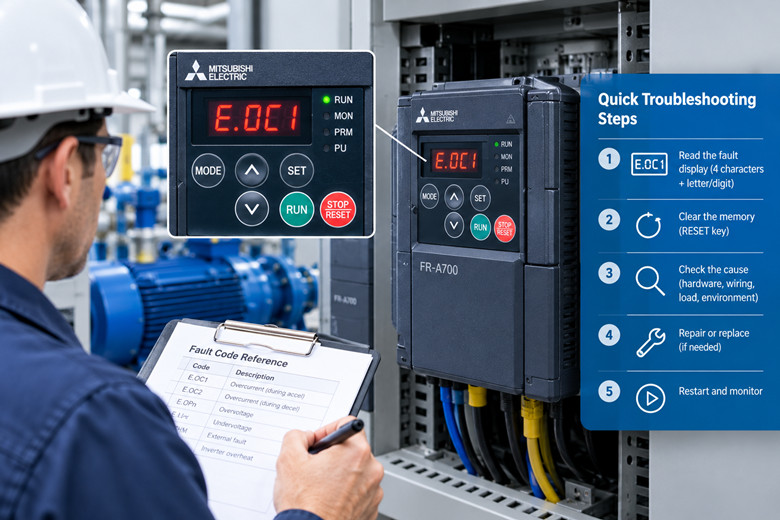
The operation panel on this generation is the FR-DU07, or the FR-PU07 if you have the larger parameter unit that some panels came with. It shows four characters, a period and a letter or digit, and it holds the last fault even after the drive has tripped and the motor has stopped. The code does not scroll away on its own. It sits there.
The first thing to understand is that a latched fault is a memory, not a live condition. The drive tripped, recorded the reason, and stopped. Pressing the RESET key on the panel clears that memory and lets you try to start again. It does not repair anything. This is the single most common mistake I see, usually by a night shift that just wants the line moving.
Resetting and running is fine as a diagnostic step, briefly, with someone watching. It is not a repair. If a drive trips on E.OC1 every time it accelerates a loaded conveyor, resetting it five times will not make the sixth start different, and each attempt stresses the output transistors a little more.
Read the code, write it down with the time, and note the load condition when it happened. A fault that appears on acceleration is a different animal from one that appears at steady speed, and the 700 series code numbers actually encode that difference. The last digit is your friend.
Confirm every code against the manual for your exact model and capacity, because Mitsubishi's coding is close to consistent across the series but not identical in every firmware revision. I have been handed a printed fault list from a different frame size more than once. When a code and the manual disagree, believe the manual that came with the drive.
The other habit worth building is reading the stored history rather than just the displayed fault. The panel and the parameter unit can step back through previous faults, and the pattern across a week tells you more than any single event. One E.FIN on a hot afternoon is weather. Four in five days is a fan that has stopped turning or an enclosure that has lost its airflow.
The overcurrent family and what usually causes it
The overcurrent faults come in three flavors, and the number after OC is the whole story.
E.OC1 is overcurrent during acceleration. E.OC2 is overcurrent at constant speed. E.OC3 is overcurrent during deceleration. When you see the code, the first thing to ask is what the drive was doing at that exact moment, because the three mean genuinely different things.
E.OC1 on acceleration is the most common of the three and the least likely to be the drive's fault. The motor is being asked to draw more current than the output stage can deliver while the frequency is climbing. That happens when the load is heavier than the settings assume, when the acceleration ramp is too short for the inertia on the shaft, or when something mechanical is dragging that should be free.
I have found everything behind an E.OC1. A conveyor gearbox with oil like tar in February. A fan with a build up of dust on one blade making it run out of balance. A pump that was rotating the wrong way after a motor rewire and pushing against a closed check valve. A coupling that had lost its rubber element and was grinding metal on metal. The drive was fine in every one of those cases. It was doing exactly what an overcurrent trip is designed to do.
E.OC2 at constant speed points somewhere else. The motor is running, the load is steady, and then current spikes. Look for intermittent mechanical binding, a bearing starting to seize, or a foreign object entering the process. On a machine that cycles, watch for a downstream jam that backloads the drive without the control system noticing.
E.OC3 during deceleration is the one people misread most often, because it looks like a braking problem and often is. When the drive slows a high inertia load, the motor becomes a generator and pushes energy back into the DC bus. If that energy cannot go anywhere, the bus voltage rises. On the overcurrent side, a deceleration trip usually means the load is driving the motor faster than the deceleration ramp wants, and the current control is fighting it.
There is one more thing behind all three that has nothing to do with the machine: a shorted or damaged motor cable. A phase to phase fault in a long, old, wet motor lead will produce an overcurrent trip that moves between OC1 and OC2 depending on when the insulation breaks down. Megger the cable before you condemn the drive. It costs twenty minutes and saves a lot of money.
The settings that buy you headroom are the acceleration and deceleration ramps and the torque boost. Lengthening a ramp costs you cycle time. Sometimes that is the right trade. Do not chase an OC1 by raising the electronic thermal and stall prevention thresholds, because those settings protect the motor, and defeating them only moves the failure to the motor winding.
Overvoltage, ground fault, and the faults that are the drive itself
Overvoltage and overcurrent sit on opposite sides of the same DC bus, and telling them apart is most of the diagnostic work.
E.OV1 is regenerative overvoltage during acceleration, E.OV2 at constant speed, and E.OV3 during deceleration. E.OV3 is by far the most common. It means the load is regenerating energy into the bus and the drive cannot absorb or dissipate it fast enough. A high inertia load on a short deceleration ramp, a crane lowering a load, an unwind stand letting go, all produce OV3.
The standard fix is a longer deceleration ramp or an added braking resistor or braking unit, if the drive and the application support one. A failing braking option shows up as E.BE, the brake transistor error, which tells you the drive's braking transistor or its external braking unit has a problem. That one you do not reset and forget, because a brake circuit that has failed will keep failing until the energy path is repaired.
The DC bus capacitors are the quiet culprit behind a lot of overvoltage faults on old drives. As they age, they lose capacitance and their ability to absorb the regenerated energy degrades. A drive that tolerated a deceleration ramp for ten years starts tripping on it in year twelve. That is not a settings problem. That is a drive reaching the end of a component's life.
E.GF is the ground fault, and it deserves its own paragraph because of how often it is misread. A ground fault means current is finding a path to earth where it should not, through a damaged cable, a wet motor, a failed winding, or a cracked output module in the drive itself. It is a safety event, not a nuisance. Do not reset a ground fault repeatedly to see if it clears. Find the path first, whether that is the motor, the cable or the drive, and clear that one component.
E.UVT is undervoltage. The drive saw the DC bus or the supply dip below what it needs to run. A genuine brownout, a loose terminal, a failing contactor, or a supply that sags when a large load starts nearby will all do it. On a coastal site the corrosion on line terminals after ten years of salt air is a real and frequent cause.
E.IPF is an instantaneous power failure, the drive's way of saying it lost its supply for a moment and did not have the ride through to keep going. It is often an external supply problem rather than a drive fault, and the questions are about the upstream breaker, the contactor and the utility.
E.FIN is heatsink overheat, and it is the most honest fault on the list. The drive is telling you it is too hot. The cooling fan has stopped, the airflow is blocked by dust, the enclosure filter is matted, or the ambient temperature in the room has crept up since the panel was designed. Fix the cooling, not the number.
E.THT is inverter overload, which means the drive as a whole is being asked for more current than its rating allows for too long. E.THM is motor overload, the electronic thermal relay tripping because the motor is drawing excess current. The pair is useful: THM points at the motor, THT points at the drive's own capacity, and the difference tells you whether your problem scaled up with load or whether the motor itself is the issue.
E.OLT is stall prevention, which is not a fault in the same sense. It is the drive's built in protection pulling back on the frequency because it sensed an overload coming, and it can appear alongside the fault display when a load jams. Stall prevention working is often the reason a machine slows instead of tripping, so seeing OLT in the history is sometimes a clue that a mechanical problem has been building for weeks.
A short list, then, of the code families: the OC family is the output current side; the OV family is the DC bus voltage side; GF is an insulation fault that is a safety concern; UVT and IPF are supply side; FIN is thermal; BE is a braking circuit failure; THM and THT are overloads of the motor and the drive respectively; OLT is load protection doing its job.
Every one of them, though, splits into two branches. The drive can be the cause, or the machine around it can be. The next two sections are where you decide which.
When the fault is the load and not the drive
I spend more time proving that a drive is innocent than any other part of the job, and I have come to look at it as a checklist that runs from the motor outward.
Start at the motor. The windings can be aging, insulation can be breaking down, and a bearing on its way out will load the drive long before it screams. An insulation test and a bearing check cost little and answer a great many questions.
Move to the cable. Long motor leads, old leads, wet leads and leads that have been spliced at some point in the last fifteen years are all suspects for OC2 and GF faults. A megger reading to earth and between phases will tell you. Coastal sites and wet process areas produce cable faults faster than dry inland sites, and the salt in the air is patient.
Look at the mechanical drive train. Gearboxes, belts, chains, couplings, bearings, and anything that can bind. An OV3 that appears on a specific deceleration move in a cycle is telling you about inertia and a ramp. An OC2 at a specific point in a batch is telling you about a mechanical event at that point. The conditions when the fault appears are the map to the cause, so write them down before you reset anything.
Look at the process. Pump impellers foul. Fans balance changes as dust builds. Conveyors get overloaded because the upstream process changed and nobody told the drive. A batch recipe was edited. A different product is running. Old installations get quietly repurposed, and the drive is the last to know.
Look at the supply. Voltage dips, phase imbalance, and loose terminals cause UVT and IPF, and a supply that was stable in 2010 may not be stable now if a neighbor added a large load. Measure the supply during a fault, not at four in the afternoon when everything is quiet.
If all of that comes back clean, then you are looking at the drive. And even then, the drive is telling the truth about something real. When the machine and the supply and the cable are all healthy and the drive still trips, the answer is usually a component inside the drive that has reached the end of its life: a capacitor, a fan, a contactor, or an output module.
I keep a running note on the wall of my workshop, four words, and it has saved me from buying drives I did not need: the load fails first. Most of the time the drive is the messenger. Reading the message properly is the whole skill.
Repair the drive or replace the machine function
Once you know the drive is actually the problem, you have a decision that costs more the longer you delay it.
The first question is whether the drive is economical to repair. Board level faults, a failed output module or a failing DC bus means a workshop repair, if the parts and the skill are still available. For a 700 series drive, the parts supply thins every year, and a drive that is already at end of service is one where repair lead times grow and success rates fall.
The second question is whether the drive is the right answer at all. A drive failure is a chance to look at the machine function rather than the part number. If the drive runs a fan or a pump with a constant duty, the FR-F800 that replaces an FR-F700 is a clean swap and often an improvement in efficiency and diagnostics. If it runs a complex machine tool or a winder with a lot of tuning in the parameters, you are carrying a tuning job with the replacement, and you should plan for it.
Do not forget the parameter set. A new drive starts empty. Every ramp, every input and output assignment, every custom map from your old unit lives in those parameters, and losing them turns a two hour swap into a two day commissioning. Print them, photograph the parameter unit, or use the FR-DU07 to read them out before the old drive leaves the building. If the old drive is dead, that becomes an archive job against the last known good copy, and if you never made one, the recovery is slow and manual.
A drive that is being repaired should be repaired as a drive, not as a control system. If the reason it failed is heat and dust in the enclosure, then a rebuilt unit goes back into the same oven and fails again. I have watched the same drive position fail three times because nobody replaced the enclosure filter or the panel cooling. Fix the environment or you will be back.
There is a hard rule I follow on production lines: if the machine stops the plant, the drive is a spare part, and spare parts get kept on the shelf. The cost of a spare is the once a year premium; the cost of not having one is a shift or a week. That math is almost never close.
Moving a 700 series drive to the 800 series
The 800 series is where Mitsubishi's support, firmware and documentation now live, and moving to it is the direction the manufacturer intends. The good news is that the move is often less painful than it looks.
For capacities at or below 280K, the FR-A800 is the same installation size as the FR-A700 in most cases. The mounting holes and the panel footprint line up, which means the swap is a mechanical non event for a great many installations. Mitsubishi publishes a parameter conversion tool and a replacement guide for exactly this transition, and it handles the bulk of the parameter mapping. The official migration path from the FR-F700 to the FR-F800 is equally well documented.
The caveats matter as much as the good news. At larger capacities, and for panel through attachments where the drive sits flush into a cutout with the heatsink outside, the depth or the cutout can differ. Measure before you buy, because the one thing worse than a drive that fails is a replacement that will not fit the panel it has to live in. Take the dimensions off the existing unit with a tape, not off the datasheet alone.
The parameter conversion is not a single button either. The tool maps most parameters, and the drive runs well on a mapped set, but the tuning you did over fifteen years to make a specific machine behave does not always translate cleanly. Input and output configurations, communication settings, and any custom logic need checking against the application after the swap. Build a commissioning window into the plan rather than pretending the swap is instant.
Migration is also a chance to fix what the old install got wrong. If the enclosure was undersized, size it correctly. If the cooling was marginal, improve it. If the input reactor or filter was missing and the harmonics were poor, this is the moment to correct it. A drive replacement is the only time you will ever have the panel open and a reason to touch the wiring, and installations should improve when they are rebuilt.
For smaller machines, the FR-E700 replacement conversation leads to the FR-D800 line for the micro drive role, and the timelines there are already firm. The compact drive on a small conveyor or a packaging machine has a definite end of service date, and the successor is the way to go when the time comes.
None of the migration work is urgent on a drive that is running well. It becomes urgent the day the drive trips and will not reset, because at that moment the clock you spent ignoring is suddenly the most expensive thing in the building.
What to put on the shelf if the line has to keep running
The plants that never panic are the ones that decided what a failure costs before it happened. For a drive on a critical line, the answer usually comes down to three items.
The first is a matching spare drive, the same capacity and the same family, sitting on a shelf with its parameters already loaded and verified. A spare that has never been powered is an assumption, not a spare, so energize it once, confirm it comes up clean, and note the firmware version. Cover the terminals and keep it out of the dust. If your line runs a family of drives, standardize on as few capacity variants as the application allows, because a shelf of one common size is worth more than four odd ones.
The second is the consumable kit for the drives you run. Cooling fans, because they have a bearing life and they fail quietly before they fail loudly. The internal battery, because a low battery is a small warning that becomes a lost parameter set if you ignore it. And the knowledge of which capacitors age, so that when you hear a drive hum differently you know what to look at.
The third is documentation. Print the parameter lists. Keep the manual for the exact model on site in the cabinet, not in an email from 2014, because the person reading it at three in the morning should not need network access. Write the fault code list on the inside of the panel door, with a note that says to confirm against the manual for the exact model.
Then there is the sourcing side, which is the part the plant buyer lives with. When a drive family has been retired, new stock is gone, and the only supply is the repair and used market. That market for Mitsubishi spare parts is alive and deep, and a genuine used or refurbished unit that matches your capacity is often the fastest route back to running, provided it comes from a source that tests it first. A tested spare still beats a rebuilt one that has never seen a load.
For the broader package of legacy drive and control spares, a supplier who deals in VFD and drive spares can usually find a matching unit or the specific board that failed, which is often a fraction of the cost of replacing the whole drive. When you have standardized on a family, tell your supplier which one, because a good one will keep an eye out for that capacity on your behalf.
The coastal pump station where this piece started is still running. We cleaned the heatsink, replaced the fan, retightened the line terminals that had gone green with salt, and it has not tripped since. The code had been there for two years because nobody had read it, and the fix, once someone did, took an afternoon.
A retired drive is not a finished drive. The FR-A700 and the FR-F700 came off the market because the company moved on to the FR-A800 and the FR-F800, not because the machines they drive reached the end of anything. Those machines will keep running for years, and the drives will keep talking to whoever is willing to listen to the display. The code is always there. The only question is how long it takes someone to read it.
Spare drives, fans, batteries and board level spares for these families are the difference between a bad afternoon and a bad quarter. If you maintain a 700 series drive, you already know which one is the oldest in the row. Put a spare next to it before it tells you it is finished.

Please read on, stay posted, subscribe, and we welcome you to tell us what you think.


Sitemap | Blog | XML | Privacy Policy
In addition, with your permission, we want to place cookies to make your visit anointeraction with slOC more personal. For this we use analytical and advertisingcookies. With these cookies we and third parties can track and collect yourinternet behawior inside and outside super-instrument.com. With this we and third parties adapt super-instrument.com and advertisementsto your interest. By clicking Accept you agree to this. If you decline, we only usethe necessary cookies and you unfortunately will not receive any personalizedcontent. Please visit our Cookie policy for more information or to change yourconsent in the future.
Accept and continue Decline cookies