Siemens Order Numbers, Decoded: How to Read an MLFB Before You Order an S7-300 or S7-400 Module
Sep 15, 2026
An MLFB is a Maschinenlesbare Fabrikatebezeichnung, a German phrase that translates as machine-readable product designation. The term names the alphanumeric code Siemens assigns to a product so that catalogues, ordering systems, and logistics can identify that product without ambiguity. The string 6ES7 321-1BH02-0AA0 is an MLFB. It is the identifier a distributor quotes against, the string an online marketplace indexes, and the value a designer records in a bill of materials. When someone in a maintenance department says "the part number," the string they mean is normally the MLFB.
Two distinctions belong at the very start, because confusion between them accounts for a large share of incorrect orders. First, an MLFB is not a serial number. A serial number identifies one individual unit and exists only once in the world. An MLFB identifies a product type, and every unit of that type ever built carries the same one. Second, an order number is not a description. "Analog input module, eight channels" describes a product; it does not identify one. The MLFB identifies one. Throughout the rest of this article, order number and MLFB are used as synonyms, which is how Siemens documentation itself uses them.
The block structure of a Siemens order number
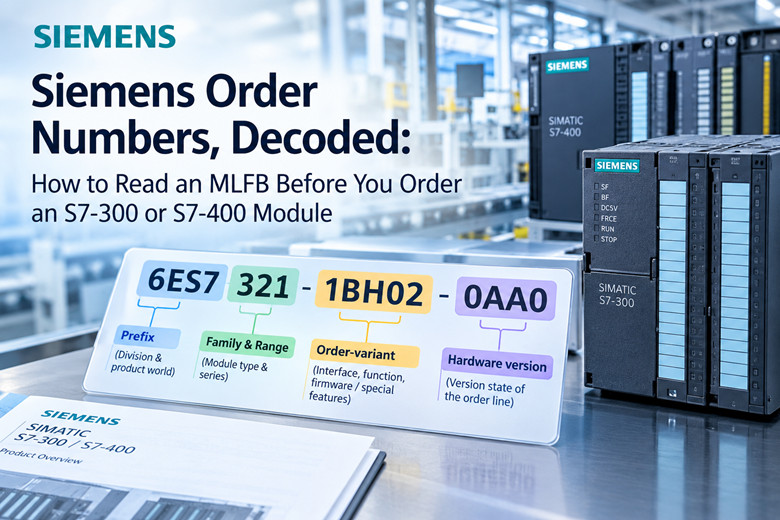
A Siemens order number is not a single unstructured string. It is a sequence of blocks, and each block carries a defined piece of information. Reading an MLFB correctly means reading the blocks in order, from the prefix on the left to the trailing group on the right. The general shape is:
1. Prefix, for example 6ES, which names the division and the broad product world.
2. Integration level digit, for example 7, which marks the automation family.
3. Family and range digits, for example 321 or 315, which identify the module type and series.
4. Order-variant digits, which carry the interface code, the function code, and firmware or special-feature information.
5. Trailing hardware-version group, for example 0AB0 or 0AE0, which closes the string.
A concrete example makes the abstraction manageable. Take 6ES7 321-1BH02-0AA0, a digital input module for the S7-300. The 6ES prefix states that this is an automation product from the SIMATIC world. The 7 states the integration level of the S7 family. The 321 states S7-300 digital input. The 1BH02 block carries the interface and function detail. The 0AA0 group closes the number and encodes the version state of that order line. Each of these blocks is examined below.
The prefix and the integration level
The 6ES prefix is the oldest and broadest of the automation prefixes. It covers the SIMATIC automation families across several generations, including S5, S7, M7, and the SC products associated with them. The digit that follows the prefix states the integration level. Where that digit is 7, the product belongs to the S7 family. This is why nearly every S7-300 and S7-400 module begins 6ES7, and why the two characters 6ES7 are effectively a family signature rather than a model indicator on their own.
The family and range digits
The next group of digits states which series and which module class the product belongs to. Within the S7 world, the range digits do the heavy lifting. A number in the 3xx block, such as 321, 322, 331, or 315, points at an S7-300 device. A number in the 4xx block, such as 421, 422, or 416, points at an S7-400 device. Note carefully that these are ranges, not single values. The module class is read inside the range: 321 is a digital input module, 322 is a digital output module, 331 is an analog input module, 332 is an analog output module, 307 is a power supply, and 315 is a CPU. The trailing digits inside the range refine the point count, the voltage class, and the electrical variant.
The order-variant blocks
After the range digits comes the order-variant area, sometimes written as the interface and function block. This section of the MLFB distinguishes modules that share a range but differ in connection, channel count, isolation, or special function. It is the block that separates a 16-point module from a 32-point module of the same class, or a standard unit from one with a diagnostic or interrupt capability. The final digits of this area, before the hyphen, often carry firmware or special-feature information. A reader who has learned the prefixes but stops reading here will still order the wrong device, because the variant block is where siblings diverge.
The trailing hardware-version group
The last group, separated by the hyphen, is the one buyers underestimate most. In 6ES7 321-1BH02-0AA0 the trailing group is 0AA0. The group encodes the hardware version state of the order line, and it also carries some packaging and configuration variants. Two strings that are identical up to that hyphen can describe physically different products. The next sections show that this trailing block is where length, pin count, and packaging differences hide, and it is the single most common source of an order that "looks right" and arrives wrong.
Prefix schemas differ by division
The block structure described above is a schema for the 6ES family. It is a mistake to assume that the same positions carry the same meaning under a different prefix. Siemens is a large company composed of divisions, and each division maintains its own prefix system. The 6ES prefix belongs to the SIMATIC automation world. The 6GK prefix belongs to SIMATIC NET communications, which covers SCALANCE switches and PROFIBUS components. The 6SL3 prefix belongs to SINAMICS drive products. The 6AV2 prefix belongs to HMI panels. A further series, 6ES7 288, identifies S7-200 SMART controllers, which live inside the 6ES world but follow conventions that are not those of the S7-300.
The practical consequence is stated as a rule: field positions are not identical across the 6ES, 6SL, and 6GK families. A digit that means "digital input" in one schema can mean something unrelated in another. Learning to read one prefix does not transfer mechanically to its neighbours. The safe method is to read the prefix first, decide which schema applies, and only then interpret the blocks that follow.
Worked example: two products that differ only in the trailing group
The clearest demonstration of the trailing-group problem comes from the pre-wired front connectors used on S7-300 modules, because these parts share nearly everything except the final characters. The order number 6ES7 922-3BD20-0AB0 identifies the 20-pin pre-wired front connector. The order number 6ES7 922-3BD20-0AC0 identifies the 40-pin version. The string up to the hyphen is identical. The pin count is not.
The two connectors also share the same cable specification: both are 3.0 m long, both use 0.5 mm2 PVC stranded wire, and both follow the DIN 47100 color code. If a buyer reads only the portion before the hyphen, the two parts are indistinguishable. The difference in usable channels is real, since a 20-pin connector cannot serve a module that expects 40 pins, and the error surfaces at the panel rather than at the desk.
Length varies in the same position. The suffix 0AF0 marks the 5.0 m version of the connector, and 0AH0 marks the 8.0 m version. The connector is electrically the same part; the length is not. This is the general lesson: the last block is where length, pin count, and packaging variations are encoded. A trailing group is not decorative, and it is not interchangeable across lines.
Hardware and firmware revision digits
The trailing group carries hardware version information, and this has consequences that reach past physical fit into firmware behaviour. Two modules can be electrically compatible at the terminal and still behave differently from the point of view of the program that drives them. The revision letters inside the variant and trailing blocks are the markers of that difference.
The FM 350-1 counter module
Consider the FM 350-1 counter module. It was released across four successive order numbers: 6ES7 350-1AH00-0AE0, 6ES7 350-1AH01-0AE0, 6ES7 350-1AH02-0AE0, and 6ES7 350-1AH03-0AE0. These are the same module family. They are successive hardware revisions, and each is noted in Siemens documentation as version 1. The revision counter advances in the middle of the string, in the 1AH00, 1AH01, 1AH02, 1AH03 portion, while the trailing group stays constant at 0AE0. The example shows that revision information is not confined to the final group. It can appear in the variant block, which is why the whole string must be read rather than skimmed.
The CPU 315-2 DP case
The clearest practical case for a maintenance engineer is the CPU 315-2 DP. Two order numbers are in common circulation: 6ES7 315-2AG10-0AB0 and 6ES7 315-2AG14-0AB0. Both are sold and both are described as CPU 315-2 DP. They are not the same piece of hardware. They are different hardware revisions with different memory and firmware behaviour.
This matters because a module that powers up is not automatically a drop-in replacement for the unit it replaced. If the STEP 7 project and the firmware in the rest of the rack expect a specific revision, a compatible-looking substitute may introduce behaviour the program was never tested against. The lesson generalizes to every CPU and every function module: revision is part of the specification, not a footnote to it.
Where the MLFB is physically found
Siemens S7-300 documentation states that the order number and the version appear at the bottom end of the module front panel. On a module already installed in a rack, the front panel is the surface you can read without pulling the unit. That printed string is the authoritative source when you have the physical module in hand, and it should be copied character for character, including the hyphen and the trailing group.
The MLFB is also visible in the hardware configuration of the STEP 7 project. When a project is opened, the module entries carry the order numbers of the configured hardware, which makes the project a second authoritative source. When a machine documents its original build, the project and the physical panel should agree. Where they disagree, the disagreement itself is diagnostic information.
A third route is the Siemens Industry Online Support product search. Typing an MLFB into that search returns the product entry, which is where lifecycle status, successor products, and revision notes are recorded. This is the correct way to confirm what an order number actually denotes when a listing or a colleague provides only a bare string. The catalogue, the panel, and the project should be read together, and the MLFB is the key that connects all three.
Practical ordering rules
The following rules follow directly from the structure described above. They are stated as ordering discipline rather than as opinion.
6. Match the full MLFB character for character wherever the exact part is available. A match on the prefix and range alone is not a match on the product. The whole string identifies the item; a partial string identifies a family.
7. When only a different revision is available, check compatibility before committing. Confirm the firmware state of the target and the development system, and be prepared to perform a firmware update where it is supported and the project can absorb it.
8. Never order from a description alone. "SM331 analog 8 channel" is a description, not an order number, and it can map to more than one order line. A description narrows the search; the MLFB closes it.
9. Treat every identical-prefix different-suffix pair as a genuine difference until the catalogue proves otherwise. Trailing groups can encode packaging and version variants as well as function, so an identical-prefix module with a different suffix needs a catalogue check rather than a guess.
10. Record the MLFB in the maintenance file when a module is installed, not when it fails. The person who needs the number most is the person under time pressure, and the panel is hard to read from the aisle.
For S7-300 and S7-400 spares specifically, a parts source that publishes full order numbers rather than loose descriptions removes a large share of the guessing. A catalogue organized by MLFB, such as the one at Siemens parts listings, lets you match the string you read off the panel against the string being sold.
Reference table: common S7-300, S7-400 and adjacent modules
The table below lists commonly requested modules with their exact order numbers. Every order number in the table is a real string; the function column is a plain-language summary, and the notes column flags anything a buyer should read before ordering. When you need a module in a PLC system, matching against a reference list of this kind at PLC listings is faster than reading each description in isolation.
Module | Order number (MLFB) | Function | Notes
SM321 DI 16xDC24V | 6ES7 321-1BH02-0AA0 | Digital input, 16 points, 24 V DC | Standard 16-point DC input for S7-300; wiring sets the sink or source behaviour
SM321 DI 16xDC24V, source input | 6ES7 321-1BH50-0AA0 | Digital input, 16 points, 24 V DC, source variant | Same range and point count as the 1BH02; the variant block differs, so the electrical connection does too
SM321 DI 16xAC120/230V | 6ES7 321-1FH00-0AA0 | Digital input, 16 points, 120/230 V AC | AC input module; the voltage class sits in the variant block, not the range digits
SM321 DI 32xDC24V | 6ES7 321-1BL00-0AA0 | Digital input, 32 points, 24 V DC | 32-point density; verify terminal and connector requirements for the point count
SM322 DO 32xDC24V/0.5A | 6ES7 322-1BL00-0AA0 | Digital output, 32 points, 24 V DC, 0.5 A | Output module of the same density; range 322 marks digital output
SM323 DI16/DO16 | 6ES7 323-1BL00-0AA0 | Combined digital input and output | Combined module; the 323 range denotes the mixed input/output class
SM331 AI 8x12bit | 6ES7 331-7KF02-0AB0 | Analog input, 8 channels, 12-bit | Range 331 marks analog input; 12-bit resolution is stated in the variant block
SM332 AO 4x12bit | 6ES7 332-5HD01-0AB0 | Analog output, 4 channels, 12-bit | Range 332 marks analog output
PS307 2A | 6ES7 307-1BA01-0AA0 | Power supply, 24 V DC, 2 A | Supply module; current rating is read from the variant block
PS307 5A | 6ES7 307-1EA01-0AA0 | Power supply, 24 V DC, 5 A | Same range as the 2 A unit, higher current; the two differ inside the variant block
CPU 314 | 6ES7 314-1AG14-0AB0 | CPU, compact class | CPU range 314; revision letters appear before the trailing group
CPU 315-2 DP | 6ES7 315-2AG10-0AB0 | CPU with PROFIBUS DP interface, earlier hardware revision | Described identically to the 2AG14 in many listings, but a different hardware revision
CPU 315-2 DP, later revision | 6ES7 315-2AG14-0AB0 | CPU with PROFIBUS DP interface, later hardware revision | Differs in revision from the 2AG10; confirm project and firmware expectations before substituting
IM 153-1, ET 200M | 6ES7 153-1AA03-0XB0 | Interface module for ET 200M distributed I/O | Trailing group 0XB0, the pattern seen on ET 200 family modules, unlike the 0AB0 on S7-300 modules
FM 350-1 counter | 6ES7 350-1AH03-0AE0 | Function module, counter | Revision information sits in the variant block (1AH03); the trailing group is 0AE0
SM 1231 AI 4xRTD (S7-1200) | 6ES7 231-5PD30-0XB0 | Analog input for S7-1200, four RTD channels | Belongs to a different controller generation; do not read its blocks using S7-300 conventions
S7-200 SMART CPU SR20 | 6ES7 288-1SR20-0AA0 | Compact CPU for the S7-200 SMART series | The 6ES7 288 series is its own schema within the 6ES world
PROFIBUS DP connector, 90 degree outlet | 6ES7 972-0BA12-0XA0 | Bus connector for PROFIBUS DP | Accessory part; the 0XA0 trailing group marks a distinct packaging and variant class
Two patterns deserve comment. The first is that a single range contains several variant blocks, and the 321 rows show it. The second is that trailing groups are not uniform across families: 0AB0, 0XB0, 0AE0, and 0XA0 all appear above, and they belong to different families and accessory classes. The last block is read in the context of the prefix, not in isolation.
Buying old stock: why the exact string is the search key
Online marketplaces and surplus sellers index modules by the exact MLFB string. The search engine does not know that you meant a 40-pin connector when you typed a 20-pin number, and it does not know that a revision letter matters to your project. It matches characters. This means the exact MLFB is the search key, and nothing softer than the exact string reliably returns the right part.
Revision differences are where surplus purchases go wrong most often. A listing that shows a photograph of a module which looks correct can carry an order number one revision away from the one you need. Because a surplus item is usually a single physical unit, there is no second unit behind it to correct the mistake. Verify the printed string in the listing against the string on your panel or in your project before payment.
Before paying a premium for old stock, confirm the lifecycle status of the order number through Siemens Industry Online Support. That portal records whether a product is active, phased out, or discontinued, and whether a successor is named. Lifecycle status is the fact that determines whether a premium is justified. A module that is no longer supported is worth what availability costs; a module with an active successor is worth no more than the successor.
Rules of the catalogue
The ten points above compress into a short set of rules for reading any Siemens order number.
11. An MLFB identifies a product type; a serial number identifies a single unit. Do not confuse the two.
12. Read the blocks in order: prefix, integration level, range, variant, trailing group.
13. The prefix decides the schema. 6ES, 6GK, and 6SL do not share field positions.
14. The range digits name the family and module class; the variant block distinguishes siblings.
15. The trailing group carries versions, lengths, pin counts, and packaging. Read it every time.
16. Revision letters can sit in the variant block as well as the trailing group. The whole string matters.
17. Order by exact string. A description narrows the search; the MLFB closes it.
18. A powered-up substitute is not automatically a compatible one. Check revision against the project and firmware.
FAQ
Where do I find the MLFB on my module?
On S7-300 modules, the order number and the version appear at the bottom end of the front panel, where they can be read with the module installed. The STEP 7 hardware configuration also carries the order numbers of every configured module, so an open project is a second source. A third source is the Siemens Industry Online Support product search, which returns a product entry when you type an MLFB into it.
What is the difference between an MLFB and a serial number?
An MLFB is a product-type designation. Every unit of that type shares it. A serial number identifies one individual unit and appears only once. The MLFB is what you order; the serial number is what you would cite if you needed to trace one specific unit through service or warranty.
Does the last block of the order number matter?
Yes. The trailing group carries version state, length, pin count, and packaging variants. The 20-pin front connector 6ES7 922-3BD20-0AB0 and the 40-pin 6ES7 922-3BD20-0AC0 differ only there, and the 0AF0 and 0AH0 suffixes mark the 5.0 m and 8.0 m lengths. An identical prefix with a different trailing group is a different purchase.
Can I fit a 315-2AG14 where a 315-2AG10 came out?
Both carry the description CPU 315-2 DP, but they are different hardware revisions. Physical fit is not the only question; the STEP 7 project and the firmware in the rack expect a defined revision behaviour. Check the compatibility of the revision against your project before treating the substitution as equivalent, and be prepared for a firmware update where the system supports one.
Why do two listings for the same module end differently?
Because the listings are not for the same module. A difference in the trailing group signals a difference in version, length, pin count, or packaging, so two listings that agree everywhere except the final characters describe two distinct order lines. Treat the divergence as meaningful and check the catalogue rather than assuming the cheaper listing is equivalent.
Are 6ES7 and 6ES5 the same thing?
No. Both sit under the 6ES automation prefix, but the integration-level digit separates the generations. 6ES5 belongs to the S5 generation and 6ES7 belongs to the S7 generation. A part from one generation is not an order-number match for the other, and the internal block meanings do not transfer.
What do I do if the exact revision is unavailable?
Establish what the exact revision is from the panel, the STEP 7 project, or the Industry Online Support entry. Then check whether the nearest available revision is documented as compatible with your configuration. Confirm the firmware state of the replacement, plan for an update if needed, and verify the lifecycle status of both the original and the substitute before committing to a surplus purchase.
Does the order number appear anywhere else besides the panel?
The Module Information dialog inside STEP 7 reports the order number of an online module, which is useful when the panel is difficult to read. The project configuration and the Industry Online Support search cover the offline case. Where all three sources are available, they should agree; where they differ, the panel printed in the factory is the authority for what is physically installed.
-------------------------------------------------------------------------------------------
🏢 About TZ Tech
TZ Tech is a leading supplier of industrial automation, electrical, instrumentation, and telecommunications components. We specialize in sourcing ready-to-ship distributor stock, allowing us to offer highly competitive pricing and short lead times. Thanks to our extensive inventory, we can even source rare and discontinued parts that are hard to find elsewhere.
🛡️ Our Quality Commitment
We understand that quality is your top priority. Every component undergoes a strict screening and inspection process so you can buy with absolute confidence. For legacy or discontinued parts, we believe in complete transparency and will always provide an honest, accurate report on the product's condition. Plus, all brand-new parts come backed by a full 1-year warranty.
✉️ Get in Touch
Have a project or a part you need? Send us your inquiry today! Our team is dedicated to providing a fast response within 6 hours (excluding weekends).