
What is a PLC? A Beginner's Complete Guide to Programmable Logic Controllers
A PLC (Programmable Logic Controller) is a ruggedized, industrial-grade digital computer designed to automate electromechanical processes in manufacturing plants, machines, and infrastructure. Unlike regular commercial computers, PLCs are built to withstand harsh industrial conditions: temperature extremes, humidity, dust, electrical noise, and vibration.
The PLC's role is straightforward: it reads inputs, makes decisions based on programmed logic, and controls outputs. Think of it as the "brain" of a machine or process—when a pushbutton is pressed (input), the PLC decides what should happen (logic) and activates a motor, valve, or indicator (output).
Before PLCs, industrial automation relied on relay panels—large cabinets filled with hundreds or thousands of electromechanical relays, timers, and contactors. Problems included: physically rewiring for any change (taking days or weeks), mechanical wear causing downtime, difficult troubleshooting, enormous space requirements, and no data collection capability.
In 1968, Bedford Associates (later Modicon) developed the first PLC—the Modicon 084—for General Motors' Hydra-Matic transmission plant. The goal was simple: replace relay panels with a programmable electronic system that could be reconfigured quickly when production changed. Within a decade, PLCs had largely replaced relay panels worldwide.
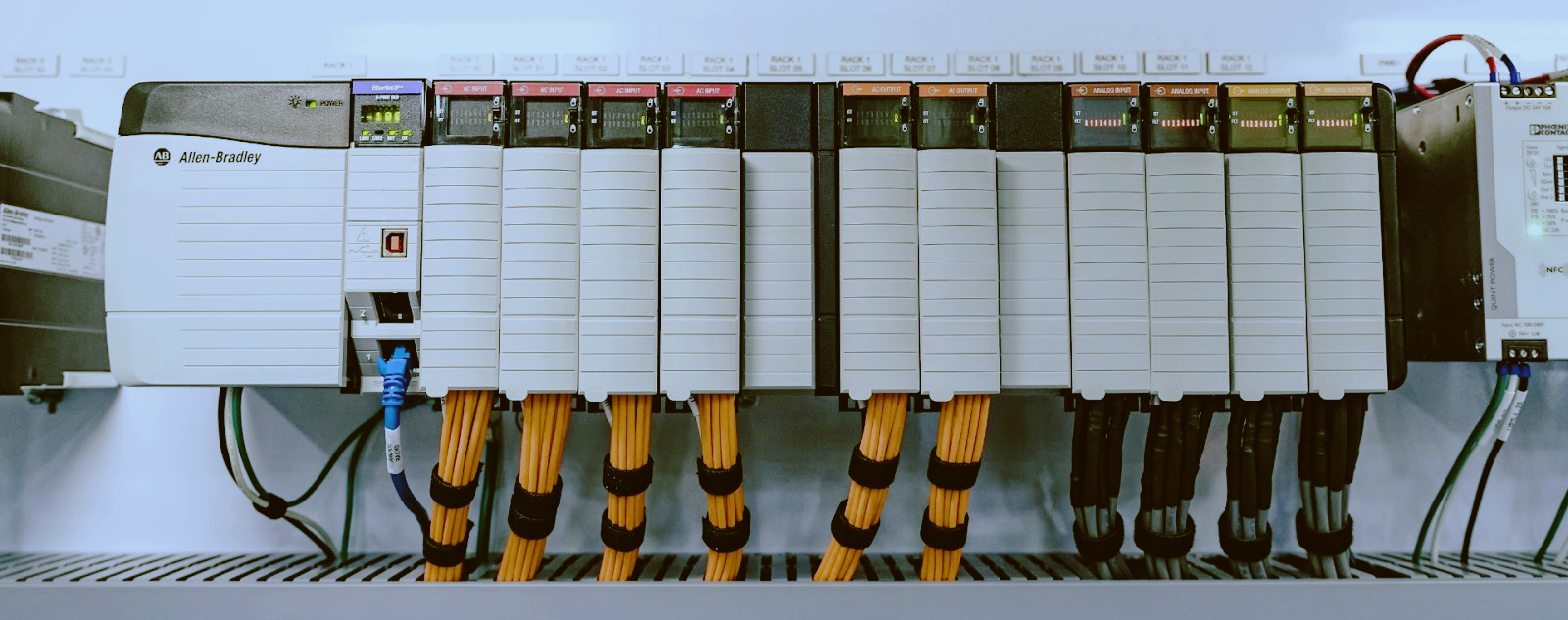
1. CPU (Central Processing Unit): The "brain" of the PLC—a microprocessor that runs the control program, performs arithmetic and logic operations, and manages communication. Key specs include memory size, scan time (ms), I/O capacity, and communication ports (Ethernet, USB, RS-232/RS-485).
2. Power Supply: Converts incoming AC mains power (110V/220V AC) to the DC voltages required by CPU and I/O modules (typically 24V DC). Critical considerations: power rating, redundancy for critical apps, and input voltage range.
3. Input Modules: Connect sensors and switches to the PLC CPU, converting real-world signals into digital data. Digital inputs (24V DC) accept pushbuttons, limit switches, proximity sensors, and pressure switches—representing only ON (1) or OFF (0). Analog inputs handle temperature sensors (RTD, thermocouple), pressure transducers, flow meters, and level sensors with signals like 4-20mA or 0-10V.
4. Output Modules: Receive commands from the CPU and control actuators. Digital outputs (24V DC, 120V AC, or relay) control solenoid valves, contactors, motor starters, indicator lights, and alarms. Analog outputs drive variable frequency drives (VFDs), proportional valves, and servo drives with standard signals like 4-20mA or 0-10V.
5. Rack/Backplane: The physical infrastructure holding all PLC modules together and providing the communication bus between them.
6. Communication Interfaces: PLCs communicate with HMIs, other PLCs, drives, and plant networks through protocols including EtherNet/IP, PROFINET, Modbus TCP/IP, PROFIBUS, DeviceNet, ControlNet, OPC UA, and serial connections (RS-232/RS-485).
The CPU executes its program in a continuous, repetitive loop called the scan cycle. Each complete cycle consists of four steps:
Step 1 – Read Inputs: The CPU reads all input module states and stores them in the input image table (typically 1-10ms).
Step 2 – Execute Program: The CPU executes the user program one instruction at a time, reading from and writing to the input/output image tables in memory.
Step 3 – Write Outputs: After program execution, the CPU updates all output modules simultaneously with values from the output image table.
Step 4 – Housekeeping: The CPU performs internal tasks including HMI/PLC communication, time-based functions, and diagnostics.
Typical scan time is 5-20ms for a medium-sized program; high-speed applications may require 0.5-1ms.
1. Ladder Diagram (LD) – The most popular language, especially in North America. Designed to look like electrical relay schematics, making it intuitive for electricians. Best for discrete logic and sequential control.
2. Function Block Diagram (FBD) – Uses graphical blocks with input/output connections. Each block performs a specific function—PID loops, arithmetic, logic gates, timers. Best for process control and PID loops.
3. Structured Text (ST) – High-level text-based language similar to Pascal or BASIC. Most powerful for complex data processing, batch processing, and advanced state machines.
4. Sequential Function Chart (SFC) – Graphical language for defining sequential processes—operations that happen in steps with actions and controlled transitions. Best for batch processes and packaging machines.
5. Instruction List (IL) – Low-level text-based language similar to assembly language. Compact and efficient but less readable. Best for simple, compact routines and legacy systems.
PLC: Designed for discrete manufacturing (individual machines, assembly lines). Fast scan times, ruggedized hardware. Scale: hundreds to thousands of I/O points.
DCS (Distributed Control System): Designed for continuous process industries (oil & gas, chemical, power generation). Highly redundant, tightly integrated with process variables. Scale: thousands to hundreds of thousands of I/O points.
Industrial PC (IPC): Designed for high-speed data processing, vision systems, and complex algorithms. PC-based, runs Windows or Linux with high computational power.
The boundaries between PLC, DCS, and IPC have blurred significantly in recent years.
Step 1: Define the application—single machine or plant-wide system, high-speed motion control needs, safety-critical requirements, current and future I/O counts.
Step 2: Evaluate the brand ecosystem—Allen Bradley dominates in the Americas, Siemens in Europe/Asia, Mitsubishi in Japan and cost-sensitive markets, ABB for process automation.
Step 3: Consider software costs—hardware is often only 30-50% of total cost of ownership; software licensing can be equally expensive (Allen Bradley Studio 5000: $5,000-$15,000+).
Step 4: Match I/O requirements—calculate digital inputs, digital outputs, and analog signals needed, adding 20% margin for future expansion.
Step 5: Verify communication requirements—HMI connectivity, plant network integration (MES/ERP), drive/PLC communication, and remote access capability.
Flagship products: ControlLogix, CompactLogix, MicroLogix, SLC 500
Programming software: Studio 5000 Logix Designer
Communication: EtherNet/IP, ControlNet, DeviceNet, Modbus
Website: www.rockwellautomation.com
Flagship products: SIMATIC S7-1500, S7-1200, S7-300, S7-400
Programming software: TIA Portal
Communication: PROFINET, PROFIBUS, Modbus TCP/IP, OPC UA
Website: www.siemens.com
Flagship products: MELSEC iQ-R, iQ-F, MELSEC-Q, MELSEC-F
Programming software: GX Works3
Communication: CC-Link IE, Modbus TCP/IP, EtherNet/IP
Website: www.mitsubishielectric.com
Flagship products: AC500, AC500-eco, AC700
Programming software: Automation Builder
Communication: EtherNet/IP, PROFINET, Modbus TCP/IP, CANopen
Website: new.abb.com/plc
Flagship products: ControlLogix (through Honeywell), Experion PKS
Programming software: Experion Studio
Communication: EtherNet/IP, Modbus, OPC UA
Website: www.honeywellprocess.com
Flagship products: NX1P2, NJ501, CP1H, CP1L
Programming software: Sysmac Studio, CX-Programmer
Communication: EtherNet/IP, Modbus TCP/IP, USB
Website: www.omron-ap.com
This guide is for educational purposes. For specific application guidance, consult with a qualified automation engineer or contact TZ TECH's technical sales team.

Please read on, stay posted, subscribe, and we welcome you to tell us what you think.


Sitemap | Blog | XML | Privacy Policy
In addition, with your permission, we want to place cookies to make your visit anointeraction with slOC more personal. For this we use analytical and advertisingcookies. With these cookies we and third parties can track and collect yourinternet behawior inside and outside super-instrument.com. With this we and third parties adapt super-instrument.com and advertisementsto your interest. By clicking Accept you agree to this. If you decline, we only usethe necessary cookies and you unfortunately will not receive any personalizedcontent. Please visit our Cookie policy for more information or to change yourconsent in the future.
Accept and continue Decline cookies